Just-In-Time (JIT) User Provisioning in Clazar
Last updated: August 13, 2025
Just-In-Time (JIT) Provisioning enables the automatic creation of user accounts in your Clazar workspace when new users sign in via SSO for the first time. This streamlines onboarding by eliminating the need for manual account creation.
Prerequisites
Before enabling JIT provisioning, ensure that:
Single Sign-On (SSO) is already configured for your Clazar account.
If SSO is not yet set up, follow the SSO Setup Guide for step-by-step instructions.
Enable Just-In-Time (JIT) User Provisioning
To activate JIT provisioning for SSO users:
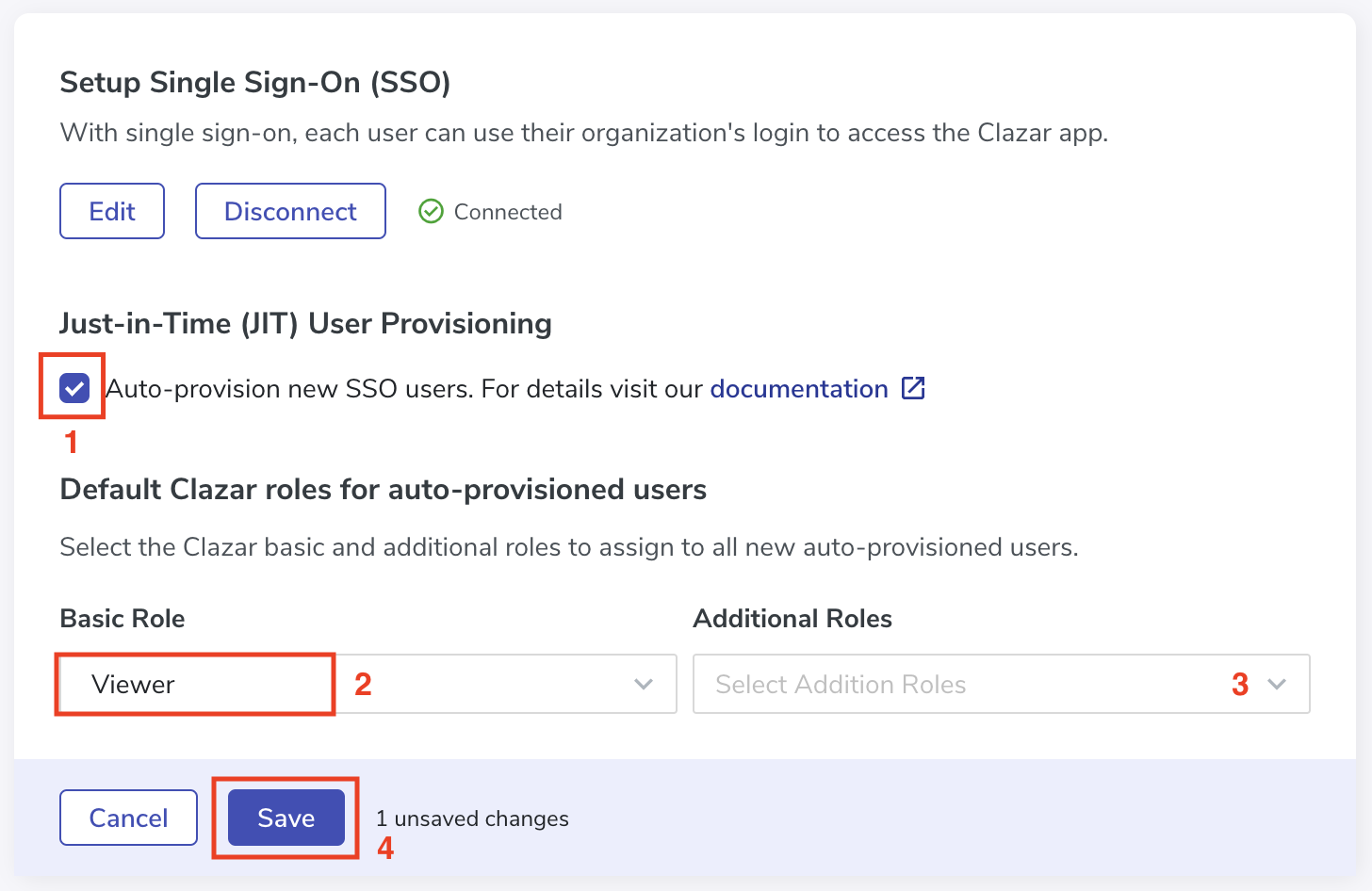
Go to Settings > Security in your Clazar dashboard.
Toggle Enable Auto-provision new SSO users.
Choose the default roles that will be assigned to newly provisioned users.
Final Steps
Once JIT provisioning is enabled:
Any first-time SSO user will automatically have an account created in your Clazar workspace.
The user will be assigned the default roles specified during setup.
Be sure to review assigned roles after user creation to confirm appropriate access levels.
Good to Know!
To maintain security and consistency, JIT-provisioned users must have an email domain that matches your seller’s domain registered on Clazar.