Ready-made views for renewals, new contracts and receivables
Last updated: November 4, 2026
Overview
Lists of contracts that renew soon, have expired or start soon, and lists of invoices that are not yet paid, meant setting the same filters every time. AWS Bookings, AWS Revenue and Azure Revenue now include built-in views for these lists, with date windows counted from today.
Value it drives
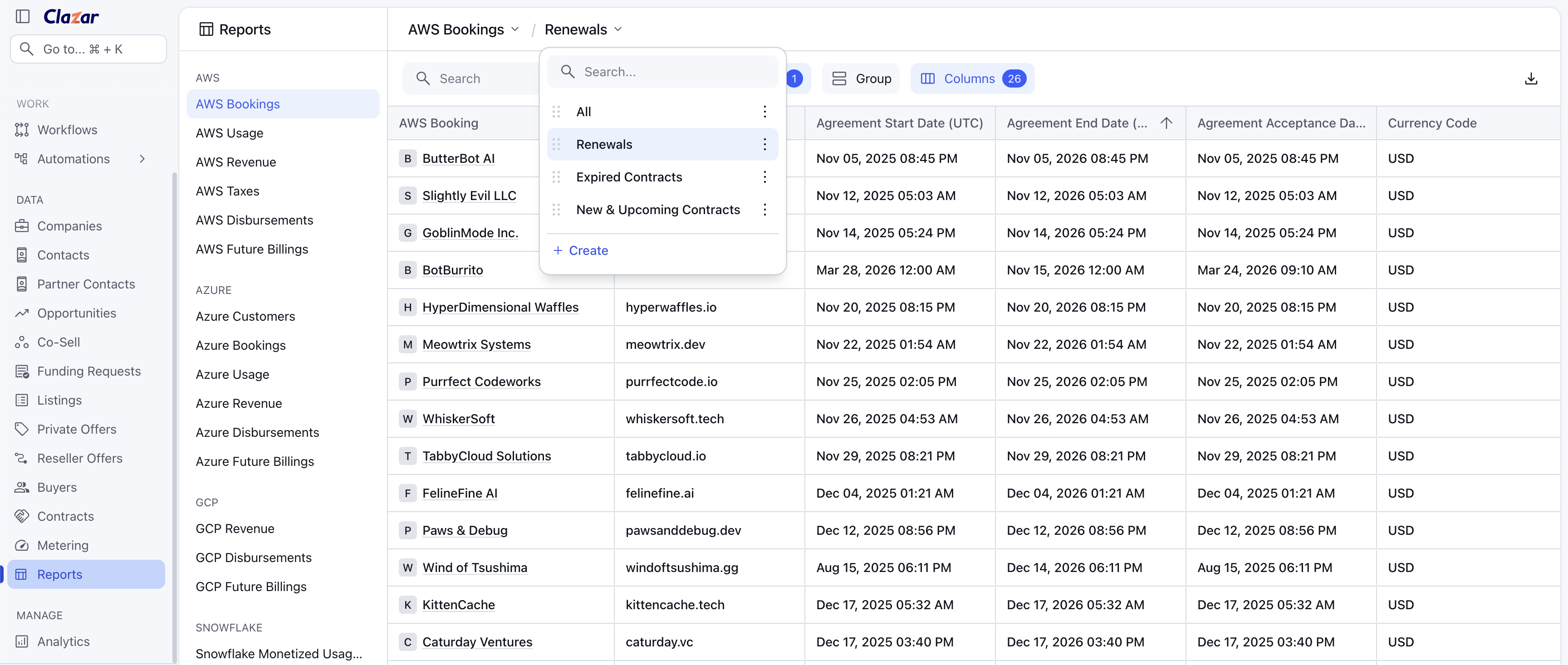
- AWS Bookings › Renewals: contracts that end in the next 90 days.
- AWS Bookings › Expired Contracts: contracts that ended in the last 90 days.
- AWS Bookings › New & Upcoming Contracts: contracts that start in the next 90 days.
- AWS Revenue › Account Receivables: invoices that are Not Disbursed or Partially Disbursed, with Undisbursed Gross Revenue, Undisbursed Net Revenue, AR Aging Days and AR Aging Category.
- Azure Revenue › Account Receivables: invoices that are Uncollected or Unprocessed, with AR Aging Bucket.
How to get started
- Open Reports: Select Reports in the left navigation, then open the report.
- Select the view: Select the view name above the table, which shows All by default, and choose a view from the list.
- Make your own copy: Built-in views cannot be edited. Add filters or columns, then select Save as New View, or use Clone from the view's menu.