Orb Setup Documentation
Last updated: September 24, 2026
Clazar is an official integration partner with Orb. Clazar's Orb integration helps sellers streamline their billing process effortlessly with cloud marketplaces. Say goodbye to manual data entry and hello to automated usage data transmission to cloud platforms. Enjoy accuracy, efficiency, and convenience in managing your billing tasks.
This guide covers Orb setup across AWS, Azure and GCP — connecting Orb, which marketplace events to act on, and which identifier to key your Orb subscription on for each cloud.
⚙️ Onboarding
Establishing the Orb connection
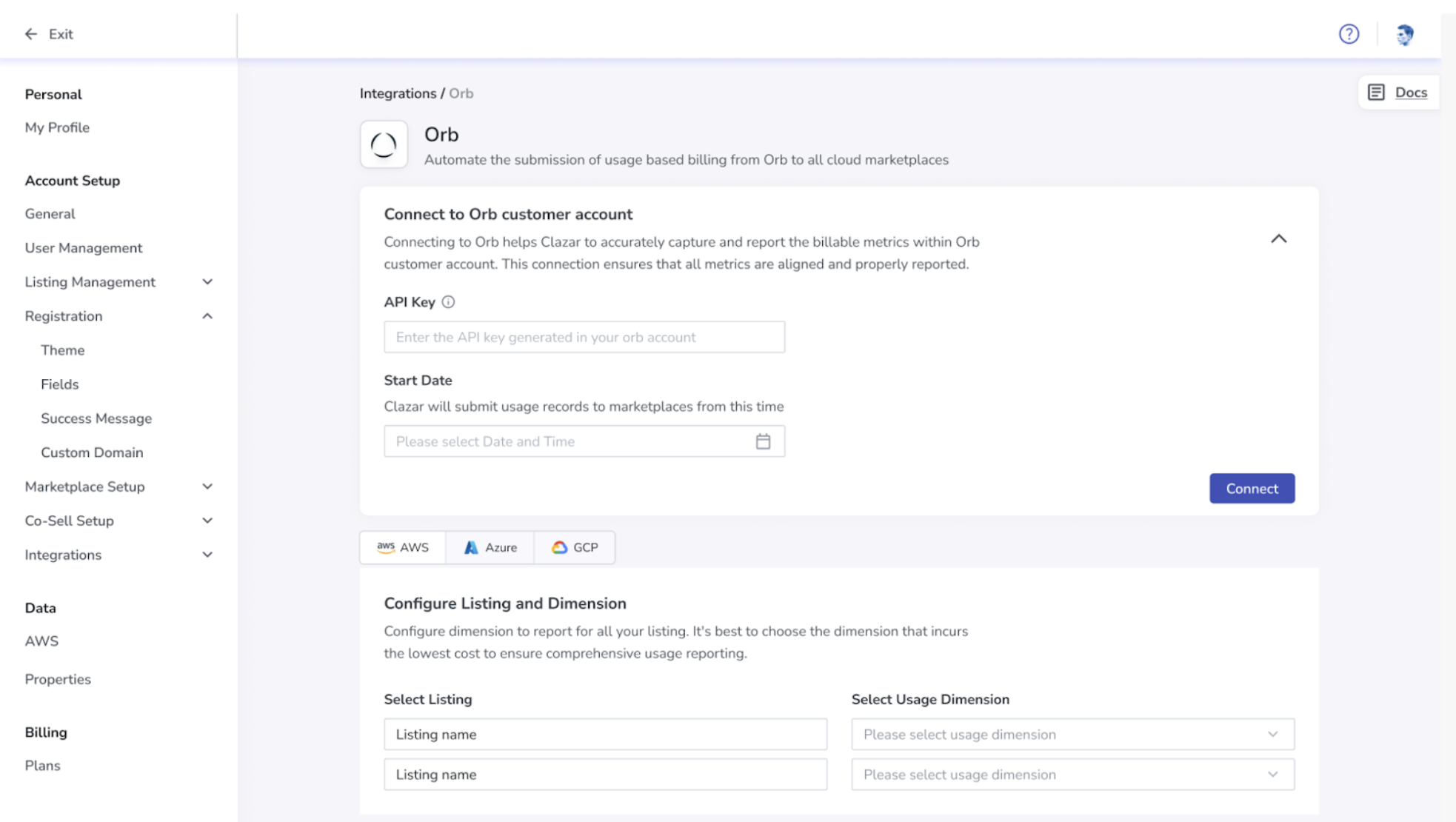
- Go to Settings → Integrations → Orb.
- Enter the API key generated in your Orb account.
- Configure the date (in UTC, time starts at 00:00:00) you want to start submitting metering records through Clazar using Orb.
- Click Connect to complete your Orb setup.
- Next, select the usage dimension Clazar should meter for each listing, under Configure Listing and Dimension — per cloud, using the AWS / Azure / GCP tabs.
- For sellers already using Orb to meter marketplace customers, map your existing Orb subscriptions to Clazar contracts using the API.
📘 The cost per unit of the usage dimension should be as granular as possible. Marketplaces can only bill in multiples of the per-unit cost mentioned.
Per-cloud prerequisites
| Cloud | What else is needed |
|---|---|
| AWS | Turn on contract events, once. In the Clazar UI, go to Settings → Integrations → AWS Marketplace, open the Setup tab and complete Clazar Event Rule Access. This provisions an event rule in your own AWS account, so it needs someone with AWS admin rights. Then subscribe to the topics you want. |
| Azure | Price that dimension statically, and keep it consistent across all plans (a small value such as $0.01 works well). Clazar derives quantity as invoice amount due ÷ dimension price, so it needs a known, stable price at metering time — dynamic dimension pricing is not supported. |
| GCP | Select the usage dimension Clazar should meter on the listing, as in step 5 above. |
🔔 The events to act on
Each cloud emits its own contract lifecycle topics.
AWS
AWS contract events are sourced from AWS Marketplace EventBridge, are emitted per contract, and are named (EventBridge) in the Clazar dashboard.
| Topic | When it fires |
|---|---|
aws.contract.created.v2 | A contract is accepted — purchase, renewal or replacement alike. provision_reason says which: NEW, RENEW or REPLACE. |
aws.contract.activated.v2 | The contract starts and its licence is live. This is the one to act on. |
aws.contract.modified.v2 | An existing contract is amended in place. Carries old_entitlements and new_entitlements so you can diff them. |
aws.contract.ended.v2 | The contract ended. end_reason says why: CANCELLED, EXPIRED, TERMINATED, RENEWED or REPLACED. |
📘 On AWS, a renewal or replacement is not one event but three:
created.v2andactivated.v2on the new contract, andended.v2(RENEWED/REPLACED) on the old one. Thatended.v2is a transition, not churn.
Azure
| Topic | When it fires |
|---|---|
azure.contract.pending | Contract created, pending activation. |
azure.contract.registered | Buyer completed SaaS registration. |
azure.contract.activated | Contract activated. This is the one to act on. |
azure.contract.quantity_changed | Number of users on the contract changed. |
azure.contract.plan_changed | Contract plan changed. |
azure.contract.renewed | Contract renewed. |
azure.contract.suspended · azure.contract.reinstated | Contract suspended, then reinstated. |
azure.contract.unsubscribed | Buyer unsubscribed — the contract has ended. |
GCP
| Topic | When it fires |
|---|---|
gcp.contract.pending | Buyer purchased the product; contract pending activation. |
gcp.contract.registered | Buyer completed SaaS registration. |
gcp.contract.activated | Contract activated and billing has started. This is the one to act on. |
gcp.contract.plan_change_initiated | A plan change is requested by the buyer, or initiated by acceptance of a new private offer while an existing contract is ongoing. |
gcp.contract.plan_changed | A plan change becomes effective. |
gcp.contract.plan_change_canceled | A plan change initiated by the buyer is revoked. |
gcp.contract.renewed | Contract renewed and extended. |
gcp.contract.canceled | Contract canceled — expired or revoked by the buyer. |
🔑 The identifiers
Clazar's contract_id is the uuid you PATCH on every cloud. Each marketplace also has its own id for the same contract, which arrives in the event metadata:
| Cloud | The marketplace's own id, in the event | Also useful |
|---|---|---|
| AWS | agreement_id (agmt-…) | license_arn, product_code, aws_account_id, previous_agreement_id |
| Azure | subscription_id | offer_id, plan_id |
| GCP | entitlement_id | account_id, plan_id |
AWS: which id is stable
| Identifier | What it is | Changes when? |
|---|---|---|
product_code | AWS's id for your listing | Never |
aws_account_id | The buyer's AWS account | Never, for that customer |
contract_id | Clazar's uuid — the id you PATCH | On every renewal and replacement |
agreement_id | AWS's own id for the same contract | On every renewal and replacement |
previous_agreement_id | The agreement_id this contract supersedes — how you find the subscription to reuse | Set on RENEW and REPLACE; null on a first purchase |
license_arn | AWS's id for the entitlement | Survives renewal, replacement and amendment. A cancellation de-provisions the licence, so a later repurchase arrives with a new one |
AWS: concurrent vs non-concurrent listings
On AWS, which identifier you key on also depends on whether the listing allows a buyer to hold more than one live agreement at a time. Concurrency is a property of the listing combined with the buyer's enrolment — if you are unsure which applies to yours, ask us. Azure and GCP have no equivalent: each subscription or entitlement is its own contract.
| Non-concurrent listing | Concurrent listing | |
|---|---|---|
| Live contracts per buyer, per listing | One | Several, at the same time |
| Key your lookups on | aws_account_id + product_code — stable for the life of the customer on that listing | license_arn. aws_account_id + product_code is not unique here — it is exactly what several live agreements share |
| Orb subscriptions for one customer on this listing | One. The customer holds a single live contract at a time, so one subscription covers them | One per live contract — several at once. A single subscription cannot be split across a customer's concurrent contracts, so each one needs its own |
| Usage is submitted to AWS with | ProductCode + CustomerIdentifier | LicenseArn + CustomerAWSAccountId, and no ProductCode |
| After a renewal or replacement | previous_agreement_id names the contract being superseded | previous_agreement_id names the previous holder of that same license_arn — not a sibling concurrent purchase |
🔗 Associating the Orb subscription
Metering runs off the link between a Clazar contract and your Orb subscription. You create it with one call — PATCH /contracts/{contract_id}/, taking contract_id from the event:
{
  "external_object_associations": {
    "orb": {
      "mapped_object": {
        "id": "<orb_subscription_id>"
      }
    }
  }
}
🔄 What to do, per scenario
| Scenario | Act on | What we recommend |
|---|---|---|
| First purchase | AWS activated.v2 (NEW) · Azure activated · GCP activated |
Create the subscription in Orb and associate it to the contract_id |
| Plan, quantity or entitlement change | AWS modified.v2 · Azure plan_changed, quantity_changed · GCP plan_changed |
Nothing to relink — same contract, same association. Update the pricing in Orb to match |
| Renewal | AWS activated.v2 (RENEW) · Azure renewed · GCP renewed |
AWS only: a renewal mints a new contract, so re-associate the same subscription to the new contract_id — find it via previous_agreement_id, or license_arn on a concurrent listing. On Azure and GCP the subscription or entitlement carries over, so no action is required |
| Replacement / upgrade | AWS activated.v2 (REPLACE, Agreement-Based Offer) · GCP plan_change_initiated → plan_changed (new private offer) |
AWS only: re-associate the same subscription to the new contract_id. On GCP the entitlement carries over — update pricing in Orb only |
| Cancel, then a new purchase later | An activated event with no predecessor — on AWS, NEW with no previous_agreement_id |
A new subscription. On AWS the licence was de-provisioned, so this is a new entitlement — same account and product code, new license_arn |
| Cancellation, expiry, termination | AWS ended.v2 · Azure unsubscribed · GCP canceled |
Metering stops. Clazar submits no further usage for this contract once it has ended |
🏗️ How metering works, end to end

📘 Clazar fetches the total cost for each marketplace contract from Orb every hour.
💬 Questions on your specific listing or dimension setup? Reach out to us on Slack or support@clazar.io. We would be happy to help.