Map AWS co-sell Seller Contact from Salesforce objects
Last updated: October 30, 2026
Overview
Previously, the Seller Contact fields on AWS co-sell opportunities could read only fields on the Salesforce Opportunity. If the seller contact was on a related record or on a Salesforce User, you had to copy the values onto the Opportunity first. Now, the Seller Contact Details section has an object dropdown. Use it to map the Seller Contact fields from a related object. With Join criteria, the Seller Contact fields can also read from an object with no lookup relation to the Opportunity, such as the Salesforce User.
Value it drives
Related object selection: A new object dropdown in the Seller Contact Details section lists the Opportunity, its related objects and the Salesforce User.
No copy step: The Seller Contact fields read the account manager from the related record. You do not need to copy the values onto the Opportunity.
No Salesforce changes: Join criteria finds the record through a text field that holds its Id. You do not need a lookup field.
How to get started
Open the mapping: Go to the Salesforce co-sell integration settings. Then open the AWS Co-Sell Mapping tab.
Select the object: Find the Seller Contact Details section. In its object dropdown, select a related object, such as User.
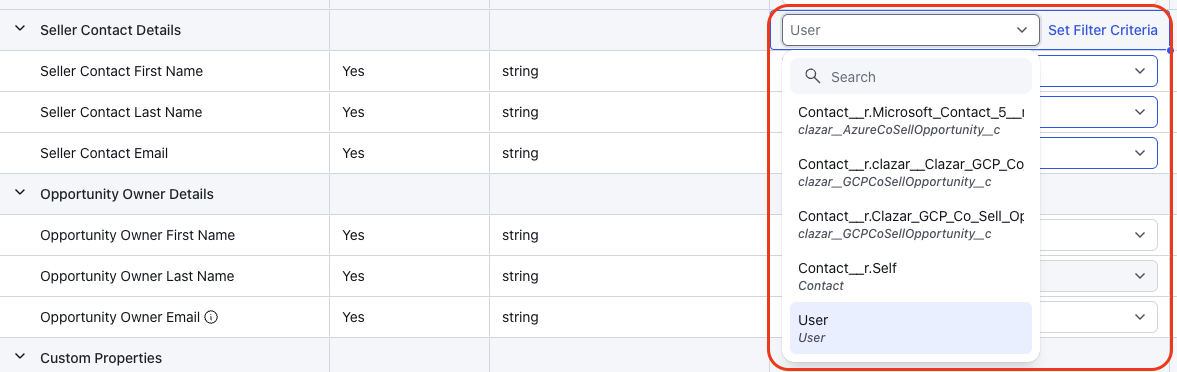
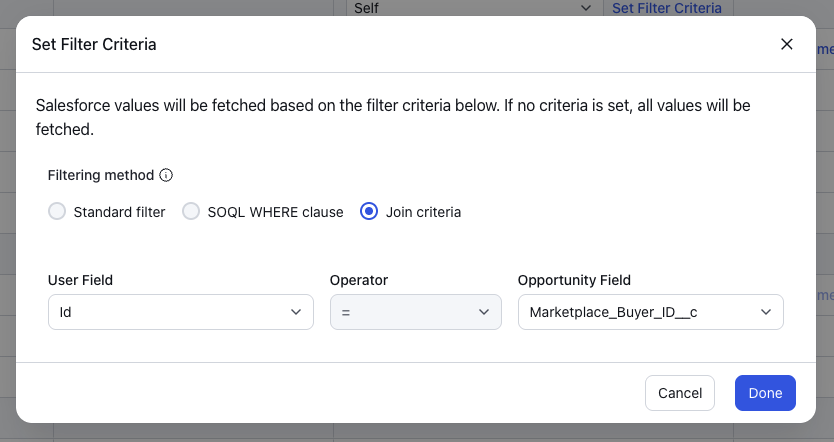
Unassociated object in the dropdown Set the filter criteria: Click Set Filter Criteria. The filter window shows the options for the object that you selected:
Related object: Set a Standard filter or a SOQL WHERE clause.
Object not related to the Opportunity, such as User: Set the Join criteria. Select the field on that object and the Opportunity field that must be equal.
Then click Done.
Map the fields: Map the email, first name and last name rows to fields on the selected object. Then save the mapping.

Things to note
Availability: This feature is available for AWS co-sell with Salesforce.
Field pickers: The Seller Contact field pickers are disabled until you select an object.
Join operator: Join criteria supports only the equals (=) operator. The Standard filter and the SOQL WHERE clause are not available for an unassociated object.
Text matches: In Join criteria, if the object field is not the Id, Clazar compares the values without case. Example: "Jane@Example.com" matches "jane@example.com".
More than one match: If more than one record matches the filter or the Join criteria, Clazar uses the record that changed most recently.
Existing mappings: Seller Contact mappings that already read from the Opportunity continue to work without changes. Their object dropdown shows Self (Opportunity).