AWS Cloud Setup
Last updated: July 16, 2026
Grant Clazar the necessary permission to manage your AWS Marketplace
Prerequisites
To ensure a smooth cloud setup process, it is important to complete the details mentioned in the Account Setup section before proceeding:
AWS Seller Account Setup
👍AWS Seller Account: Completed
Once you have successfully completed the Account Setup section, the status of the AWS Cloud Setup will be marked as completed.
To gain further understanding of the Seller registration process, refer to the Seller Registration Process documentation.
Clazar Role and Access
To set up Clazar Role and Access within your AWS environment, follow the steps below:
Log in to your account on the Clazar Platform.
Go to the Integrations section of the platform.
In the Cloud Marketplace section, find and click on AWS to initiate the cloud setup process.
Ensure that you have completed the prerequisites mentioned earlier for the AWS Seller account setup.
Launch Stack
In the Clazar Role and Access section, you will find the Launch Stack button. Click on this button to launch the CloudFormation Stack, which will set up the necessary AWS resources within your AWS account.

After launching the CloudFormation stack, you will be directed to the Quick Create Stack page.
📘What is CloudFormation?
CloudFormation is an AWS service that enables you to define and provision your infrastructure resources in a declarative manner using JSON or YAML templates. It allows for efficient, automated creation, modification, and deletion of AWS resources.
Acknowledge the Stack Capabilities
Before proceeding with the CloudFormation stack creation, it is essential to understand and acknowledge its capabilities.
By creating the CloudFormation stack, you acknowledge the following:
The stack will create and modify AWS resources in your AWS account.
The stack may include IAM roles, policies, and other permissions that grant access to your AWS resources.
The stack may execute custom scripts or code to configure and deploy resources.
Stack Creation
By acknowledging the capabilities of the CloudFormation stack, you can proceed with the creation process confidently. After clicking on the Create Stack button, the stack creation will commence.


stack creation
📘Acknowledgement
It is crucial to review the stack template and ensure that you understand the changes it will make to your AWS environment.
CloudFormation Stack
Once you click on the Create Stack button, the CloudFormation stack creation process will begin, and you will be able to monitor the stack events.
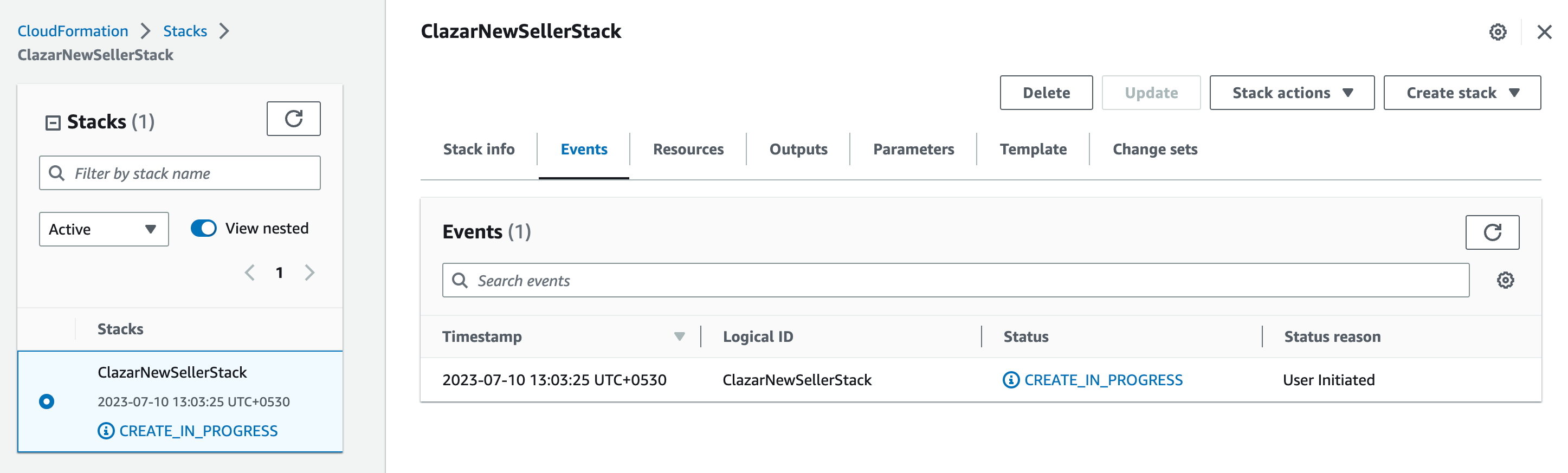
CloudFormation Stack
The CloudFormation stack creation process may take some time to complete. Be patient during the process.
Once the stack creation process is successfully completed, the Clazar Role and Access will be marked as Connected.
However, in the event of any issues during the stack creation, the stack will fail and trigger a rollback. In such cases, the status will be marked as Error.
Clazar Role and Access Status
👍Clazar Role and Access: Connected
Once the CloudFormation stack has completed its creation process, the status of the Clazar Role and Access will be updated and marked as "Connected".

Clazar Role and Access
❗Clazar Role and Access: Error
If there will be an error then the status of the Clazar Role will be marked as "Error".

📘Support
If you encounter any issues or need further assistance during the Clazar Role and Access configuration, please reach out to the Clazar support team. They will provide guidance and support to help address any concerns you may have.
After successfully completing the Clazar role and access, the Clazar platform will automatically fill in the CAS and SDDS data input.
Commerce Analytics Service (CAS)
To begin using the AWS CAS (Commerce Analytics Service), follow these steps:
Enroll in the AWS CAS service by completing the AWS CAS Enrollment Form.
Once you have successfully completed the enrollment process, confirm that you are enrolled in CAS on the Clazar platform.
Access the CAS section on the Clazar platform and select the Enrolled in CAS option.
To ensure that the configuration is functioning correctly, click on the Test Configuration button to perform a test and validate the setup.
Copy the values of the fields and paste them into the AWS CAS Enrollment form
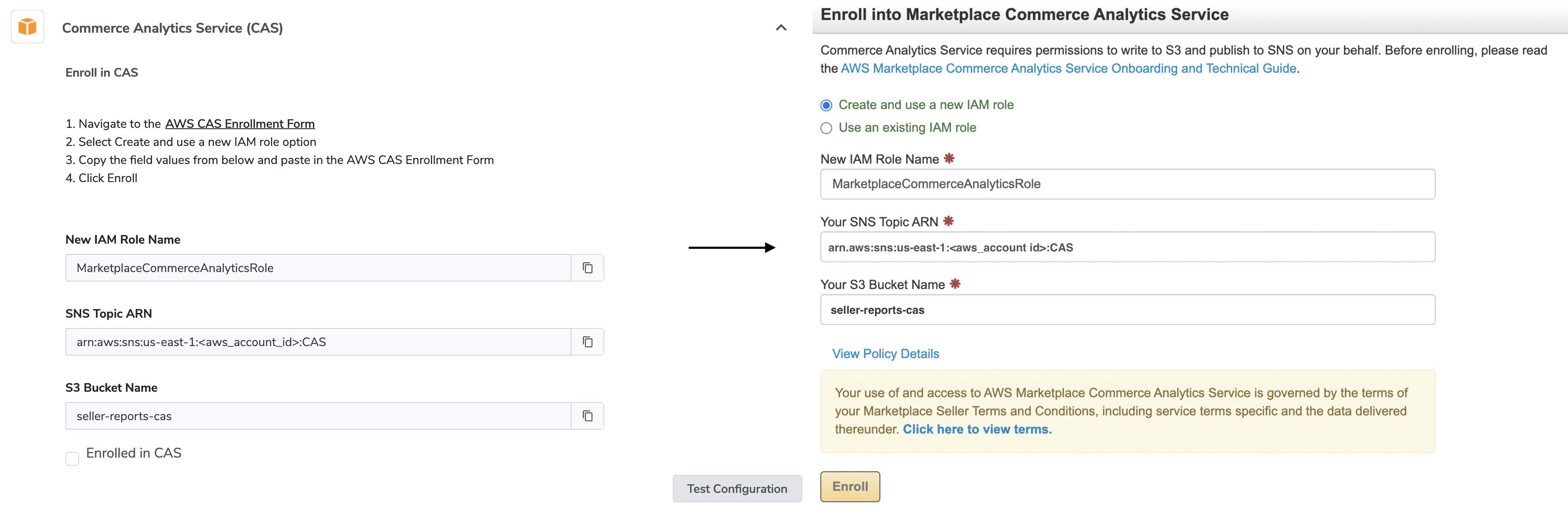
Enroll CAS
👍CAS: Connected
If the test passes, the status will be marked as "Connected".
❗CAS: Error
In case of a failure, the status will be marked as "Error".
Seller Data Feed Delivery Service (SDDS)
Enroll in the AWS SDDS service by completing the AWS SDDS Enrollment Form.
Once you have successfully completed the enrollment process, confirm that you are enrolled in SDDS on the Clazar platform.
Access the SDDS section on the Clazar platform and select the Enrolled in SDDS option.
To ensure that the configuration is functioning correctly, click on the Test Configuration button to perform a test and validate the setup.
Copy the field values and paste them into the SDDS enrollment form.
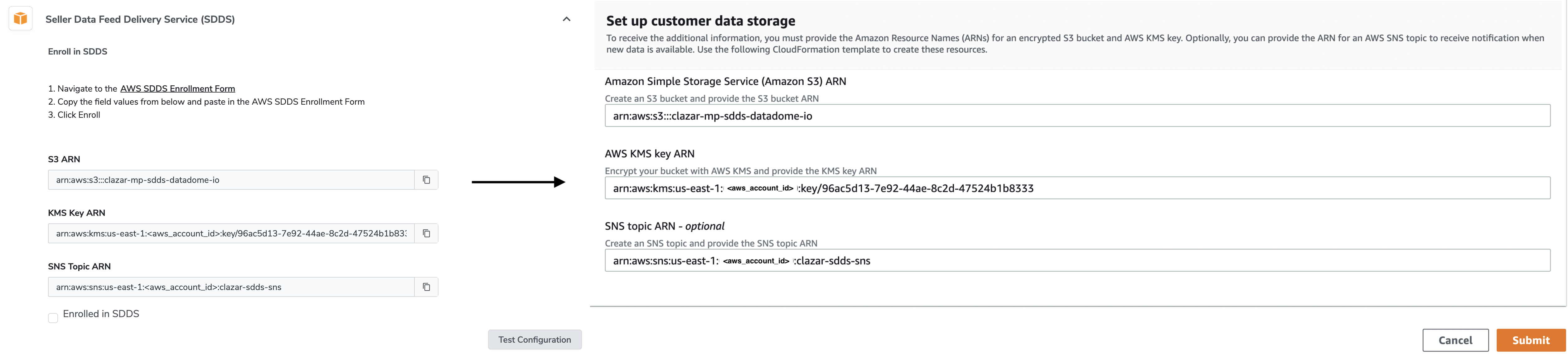
Enroll SDDS
👍SDDS: Connected
If the test passes, the status will be marked as "Connected".
❗SDDS: Error
In case of a failure, the status will be marked as "Error".
Permissions and Roles
The CloudFormation stack creates the following permissions, roles, and policies:
Clazar Role
1. Clazar Role:
The role which Clazar assumes to perform all functions in the account
Permissions:
sts:AssumeRole
Principle: arn:aws:iam::${ClazarAccountId}:root
2. Clazar Role Policy Access
Used to check whether ClazarRole has the correct policies attached
Permissions:
iam:GetRole
iam:ListRolePolicies
iam:GetRolePolicy
iam:PassRole
Resource: ClazarRole.Arn
Clazar Reporter
1. Clazar Reporter Function Role
Allows Clazar to execute Lambda functions for reporting.
Permissions:
sts:AssumeRole
Resource:
ManagedPolicyArns:
-arn:aws:iam::aws:policy/service-role/AWSLambdaBasicExecutionRole
Principle:
2. Clazar Reporter Function
This lambda function is used one time only to call Clazar's API with this stack's output
Clazar SQS
1. Clazar SQS Queue
An SQS Queue which subscribes to marketplace SNS, CAS SNS, and SDDS SNS notifications.
2. Clazar SQS Access
Provides access to manage Clazar SQS queues.
Resource: ClazarSqsQueue.Arn
Clazar Marketplace Access
1. Clazar MarketplaceAccessPolicy
Grants Clazar Role the permissions to perform AWS marketplace seller activities
Permissions:
aws-marketplace:*
aws-marketplace-management:*
vendor-insights:*
2. ClazarMarketplace SNS Access Policy
Grants Clazar Role the permissions to subscribe to marketplace SNS
Permissions:
sns:Subscribe
sns:Unsubscribe
sns:GetTopicAttributes
sns:GetSubscriptionAttributes
sns:ListSubscriptionsByTopic
Resource:
arn:aws:sns:::aws-mp-subscription-notification-*
arn:aws:sns:::aws-mp-entitlement-notification-*
arn:aws:sns:::clazar-*
CAS & SDDS
Learn more about CAS and SDDS permissions
1. CAS Bucket
CAS datasets are delivered to this bucket
2. CAS SNS Topic
The SNS topic where notifications of newly generated CAS datasets will be delivered
3. Clazar Generate CAS Policy
Marketplace API call used to generate CAS datasets
Permissions:
marketplacecommerceanalytics:GenerateDataSet
4. Clazar Analytics SNS Access Policy
Grants Clazar Role the required permissions to CAS SNS, and SDDS SNS notifications.
Permissions:
sns:Subscribe
sns:Unsubscribe
sns:GetTopicAttributes
sns:GetSubscriptionAttributes
sns:ListSubscriptionsByTopic
Resource:
CasSnsTopicArn
SddsSnsTopicArn
arn:aws:sns:::clazar-*
5. Clazar S3 Access Policy
Allow permission to get objects from CAS and SDDS buckets
Permissions:
s3:GetObject
s3:ListBucket
s3:GetBucketRegion
Resource:
All objects in CAS and SDDS buckets
6. Clazar KMS Key Access Policy
Allow Clazar Role access to KMS keys used in CAS and SDDS buckets
Permissions:
kms:Encrypt
kms:Decrypt
kms:DescribeKey
kms:GenerateDataKey
Resource:
Condition: StringLike: "kms:EncryptionContext:aws:s3:arn":-arn:aws:s3:::${SddsBucketName}/-arn:aws:s3:::${CasBucketName}/
7. CAS SNS Subscription
Subscribe CAS SNS to Clazar SQS
8. SDDS SNS Subscription
Subscribe SDDS SNS to Clazar SQS
9. Clazar SQS Send Policy
Allow CAS and SDDS SNS to send messages to Clazar SQS.
Permissions:
SQS:SendMessage
Resources:
Condition:
ArnLike:
CasSnsTopicArn
SddsSnsTopicArn
FAQs
Q: What is the purpose of setting up an AWS Seller Account?
A: An AWS Seller Account is required for marketplace activities and enables you to manage and sell your products or services through the AWS Marketplace.
Q: Why do I need to complete the prerequisites for the AWS Seller Account setup?
A: The prerequisites ensure that your AWS Seller Account is properly configured with the necessary information and permissions for smooth integration with Clazar.
Q: How does the CloudFormation stack help in the setup process?
A: The CloudFormation stack automates the creation and configuration of the required AWS resources, roles, and permissions needed for the Clazar integration.
Q: How long does it take to complete the CloudFormation stack creation process?
A: The time taken for CloudFormation stack creation may vary depending on the complexity of the stack and the AWS services involved. It is recommended to be patient during the process.
Q: What should I do if the CloudFormation stack creation fails?
A: In case of a failure, the stack will trigger a rollback, and the status will be marked as "Error." You should review the error messages and reach out to Clazar support for assistance.
Q: How can I test if the CAS (Commerce Analytics Service) and SDDS (Seller Data Feed Delivery Service) configurations are working correctly?
A: You can use the "Test Configuration" feature provided on the Clazar platform to perform a test and verify the connectivity and functionality of CAS and SDDS.
Q: What should I do if I encounter any issues during the Clazar Role and Access configuration?
A: If you face any difficulties or have questions regarding the Clazar Role and Access setup, it is recommended to contact Clazar support for guidance and assistance.