End-to-End Workflow for AWS Marketplace Metering with Clazar (Self-Hosted Registration)
Last updated: August 5, 2025
This document explains how to enable AWS Marketplace usage metering using Clazar. It combines the event workflow, API usage, payload examples, self-hosted registration steps, and key recommendations for sellers.
1. Key Components
Listing Purchase – Buyer purchases your listing on AWS Marketplace.
Contract – AWS creates a contract linked to the buyer.
Buyer Registration – Buyer completes registration on your platform via a self-hosted registration page.
Metering – Usage is reported hourly to AWS via Clazar.
2. Self‑Hosted Registration Setup
Steps to Configure
Create a POST Endpoint – Publicly accessible endpoint to receive Clazar POST requests.
Verify Payload Integrity
Clazar sends headers:
{
"X-Clazar-Signature": "<signature>",
"X-Clazar-Timestamp": "<timestamp>"
}
Construct message as timestamp.payload, generate an HMAC SHA‑256 signature with the secret, and compare with X-Clazar-Signature.
Process Buyer Info
Example payload:
{
"cloud_details": {
"ProductCode": "4abcd7cksf2sl82bytk12ffj7",
"CustomerAWSAccountId": "123458492006",
"CustomerIdentifier": "ABcdH7jsXqL"
},
"clazar_listing_id": "0abc6f67-9822-8b68-8f5c-145e7db863cb",
"clazar_buyer_id": "a1b2c366-d5a1-49d3-ac55-6c537f481c58",
"cloud": "aws"
}
Redirect Buyer – Respond with a 302 redirect including Location header to your registration page.
3. Event Workflow Scenarios
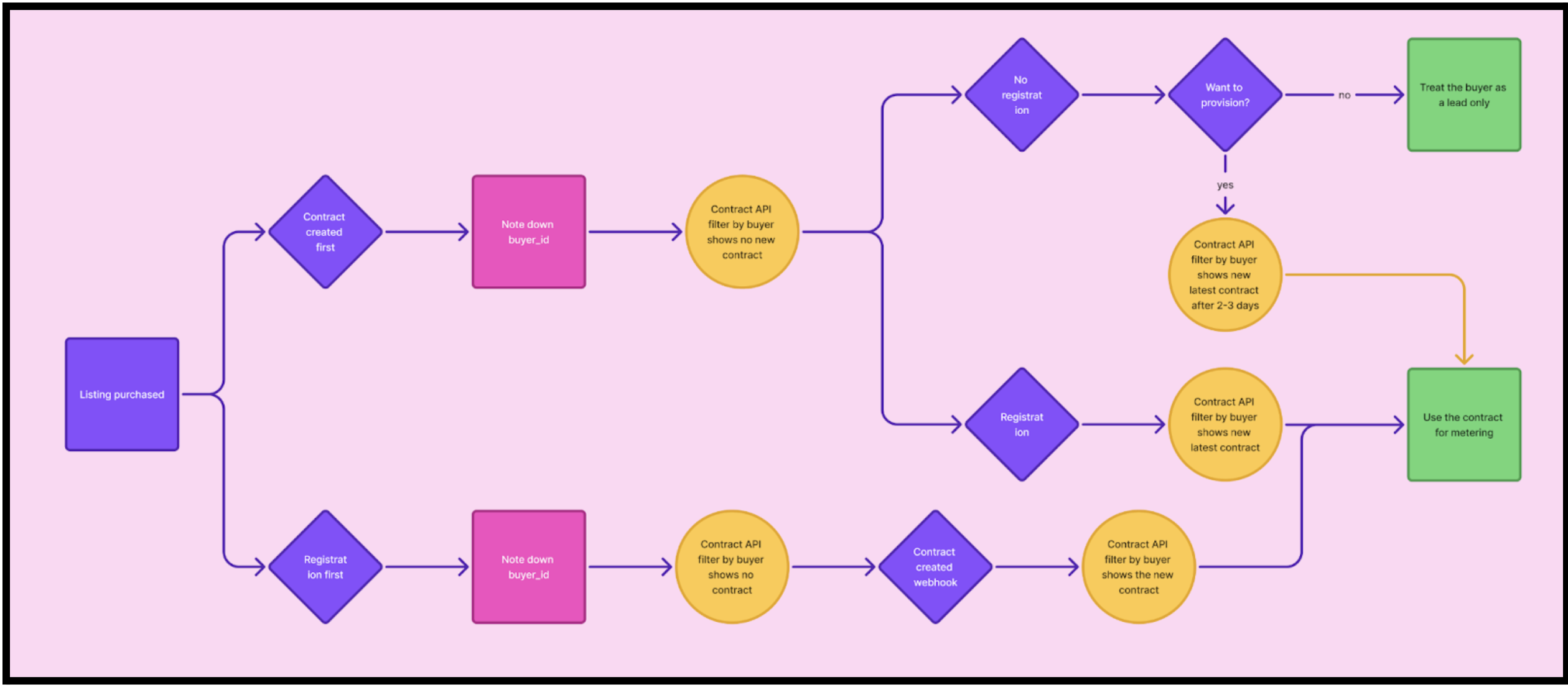
Scenario 1: Contract Created First
AWS creates the contract. Buyer ID is returned.
Call GET /contracts?filter[buyer_id]={buyer_id}.
If no contract yet, check registration:
If registration done → API returns latest contract → Use for metering.
If registration NOT done:
Decide whether to provision:
No → Treat buyer as a lead only.
Yes → Wait 2–3 days, retry API, get contract, use for metering.
Scenario 2: Registration First
Buyer registers first.
Record buyer_id and call GET https://api.clazar.io/contracts?buyer_id={buyer_id}.
Likely returns no contract yet.
Wait for contract-created webhook.
On webhook, call API again → retrieve contract → use for metering.
4. API Calls
Retrieve Contracts
GET https://api.clazar.io/contracts?buyer_id={buyer_id}
Authorization: Bearer {token}
Response Example:
[
{
"id": "contract_123",
"buyer_id": "buyer_ABC",
"listing_id": "listing_XYZ",
"status": "active",
"contract_id": "AWS-contract-ID",
"created_at": "2025-07-29T12:34:56Z"
}
]
Submit Usage (Metering)
POST https://api.clazar.io/metering/
Authorization: Bearer {token}
Content-Type: application/json
Request Example:
{
"buyer_id": "buyer_ABC",
"listing_id": "listing_XYZ",
"dimension": "api_calls_per_hour",
"quantity": 120,
"timestamp": "2025-08-01T14:00:00Z"
}
5. Timing Guidelines
Action Timing | |
6. End-to-End Flow Summary
Step API/Event Used Outcome | ||
7. Flowchart
8. Recommendations for Sellers
Always store the buyer_id to link all communications and usage records to the correct customer.
Use the Contract API filtered by buyer_id as the primary method to retrieve contract details.
Register and listen to the contract-created webhook, regardless of event order, to detect contract creation faster.
Call the Contract API after receiving the contract-created notification to fetch the latest contract details.
Provision accounts only after contract confirmation to avoid misattribution of usage.
Combine webhook + periodic polling for reliable contract detection.
Keep metering submissions idempotent to prevent duplicate charges.