Self-Hosted Registration with Clazar
Last updated: August 8, 2025
This guide explains how to configure a self-hosted registration endpoint for integrating with Clazar. By setting this up, you can handle buyer registration directly on your platform when users subscribe via AWS, Azure, or GCP Marketplace.
📌 Overview
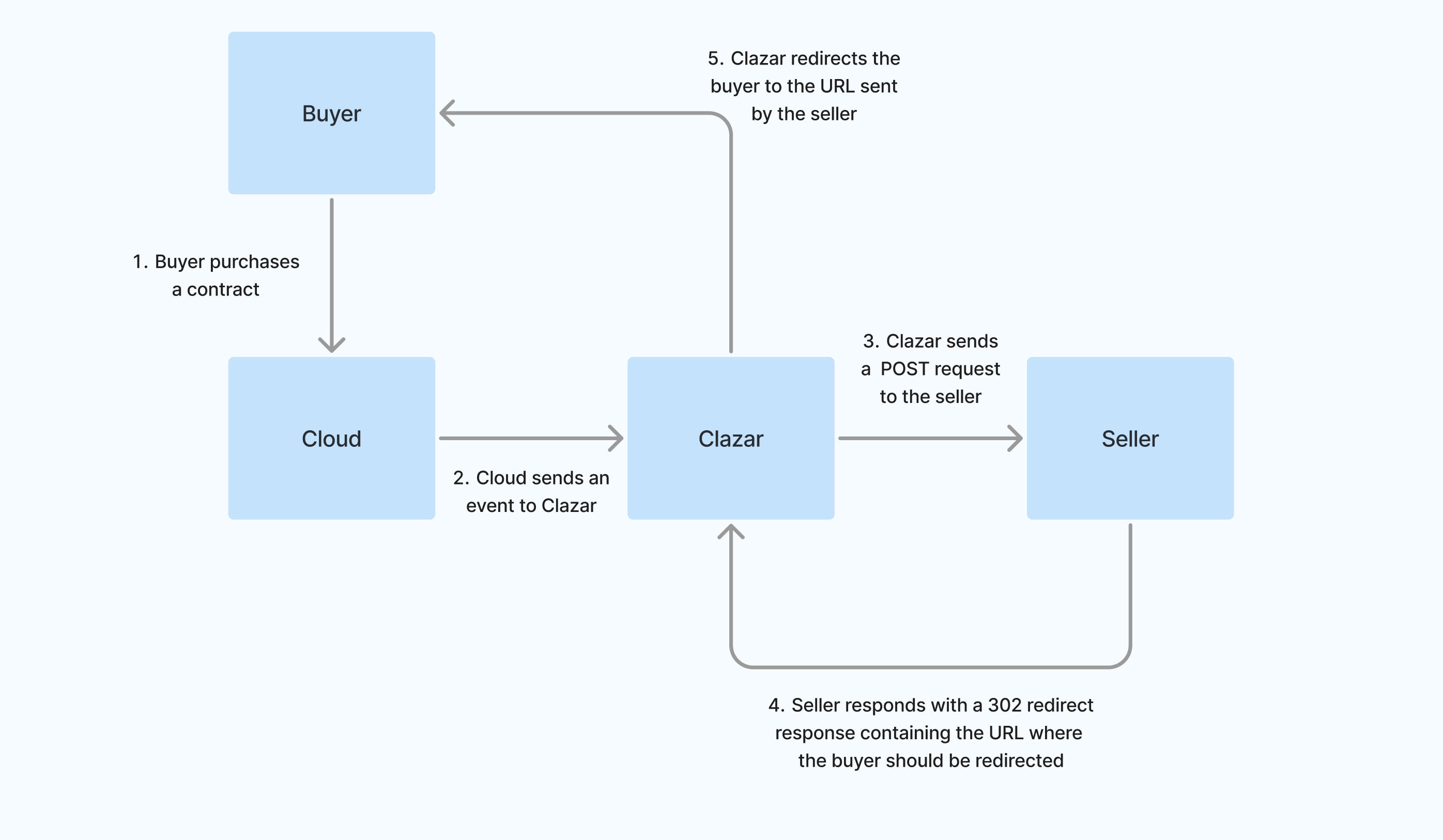
When a buyer subscribes to your listing on a cloud marketplace, Clazar sends a POST request to your configured endpoint. This request contains cloud-specific data in the payload.
To ensure data security:
A signature-based approach is used.
Your endpoint must verify the signature and ensure the request hasn’t been tampered with.
Upon validation, respond with a
302 Redirectcontaining the URL to complete registration.
🏗 High-Level Architecture
📊 Data Flow Diagram of Self-Hosted Registration Flow
🛠 Step-by-Step Instructions
✅ Step 1: Create an Endpoint to Receive POST Requests
Set up a publicly accessible HTTP POST endpoint on your server.
This endpoint will receive requests from Clazar.
Register this endpoint in the Clazar app configuration.
✅ Step 2: Verify the Signature to Check Data Integrity
Clazar sends the following headers:
{
  "X-Clazar-Signature": "<signature>",
  "X-Clazar-Timestamp": "<current_timestamp>"
}
The request body will contain the payload with the cloud-specific information.
To verify the integrity of the data, follow these steps:
🔐 Construct the Message
Concatenate the timestamp and payload:
message = f"{timestamp}.{payload}"
🚧 Note: Payload must be key-sorted before signature generation.
🔐 Generate the Expected Signature
To calculate the expected signature, use the signing secret provided by Clazar to create a HMAC (hash-based message authentication code) and generate the signature. Below is the example for different programming languages
🐍 Python
import hmac
import hashlib
import base64

def generate_signature(secret_key, message):
    secret_key_bytes = secret_key.encode('utf-8')
    message_bytes = message.encode('utf-8')
    hmac_signature = hmac.new(secret_key_bytes, message_bytes, hashlib.sha256).digest()
    return base64.b64encode(hmac_signature).decode('utf-8')

# Example usage
secret_key = "your_secret_key"
message = f"{current_timestamp}.{json.dumps(request_data, sort_keys=True, separators=(',', ':'))}"
signature = generate_signature(secret_key, message)
print("Signature:", signature)
🟦 Node.js
const crypto = require('crypto');

function generateSignature(secretKey, message) {
    return crypto.createHmac('sha256', secretKey)
                 .update(message)
                 .digest('base64');
}

function sortObjectKeys(obj) {
  if (typeof obj !== 'object' || obj === null) return obj;

  if (Array.isArray(obj)) return obj.map(sortObjectKeys);

  return Object.keys(obj).sort().reduce((result, key) => {
    result[key] = sortObjectKeys(obj[key]);
    return result;
  }, {});
}

// Example usage
const secretKey = "your_secret_key";
const sortedBody = sortObjectKeys(req.body);
const payload = JSON.stringify(sortedBody);
const message = `${timestamp}.${payload}`;

const signature = generateSignature(secretKey, message);
console.log("Signature:", signature);
☕ Java
import javax.crypto.Mac;
import javax.crypto.spec.SecretKeySpec;
import java.util.Base64;

public class HMACSignature {
    public static String generateSignature(String secretKey, String message) throws Exception {
        Mac sha256_HMAC = Mac.getInstance("HmacSHA256");
        SecretKeySpec secret_key = new SecretKeySpec(secretKey.getBytes(), "HmacSHA256");
        sha256_HMAC.init(secret_key);
        byte[] hmacBytes = sha256_HMAC.doFinal(message.getBytes());
        return Base64.getEncoder().encodeToString(hmacBytes);
    }

    public static void main(String[] args) {
        try {
            String secretKey = "your_secret_key";
            String message = "timestamp.payload";
            String signature = generateSignature(secretKey, message);
            System.out.println("Signature: " + signature);
        } catch (Exception e) {
            e.printStackTrace();
        }
    }
}
🔍 Compare Signatures
Match your generated signature with the value of
X-Clazar-Signature.If they don’t match, reject the request as it may be tampered.
⏱ Handle Replay Attacks
Ensure the
X-Clazar-Timestampis within a reasonable tolerance (e.g. 5 minutes).If it’s too old, reject the request.
✅ Step 3: Process the Cloud Information
Clazar sends cloud-specific data in the payload. Use this to identify the buyer and map them to your system.
📦 AWS Example
{
  "cloud_details": {
    "ProductCode": "4abcd7cksf2sl82bytk12ffj7",
    "CustomerAWSAccountId": "123458492006",
    "CustomerIdentifier": "ABcdH7jsXqL"
  },
  "clazar_listing_id": "0abc6f67-9822-8b68-8f5c-145e7db863cb",
  "clazar_buyer_id": "a1b2c366-d5a1-49d3-ac55-6c537f481c58",
  "cloud": "aws"
}
🔵 Azure Example
{
  "cloud_details": {
    "subscriptionName": "Example Subscription",
    "offerId": "example-offer-id",
    "planId": "example_ab12csf1-s2d8-1245-ab53-1234424b99ac-vs",
    "id": "123cef2f-5b28-4s5d-abcd-d3ag8821av13",
    "subscription": {
      "allowedCustomerOperations": ["Delete", "Read", "Update"],
      "purchaser": {
        "puid": "1234000A09FF123",
        "tenantId": "abc123b0-be36-5f2a-7avx-ds6123a56532",
        "emailId": "name@example.com",
        "objectId": "abc123b0-be36-5f2a-7asf-ds6123a12345"
      },
      "created": "2024-01-01T21:09:11.6442825Z",
      "isFreeTrial": false,
      "saasSubscriptionStatus": "PendingFulfillmentStart",
      "publisherId": "example1234578901234",
      "beneficiary": {
        "puid": "12345000F09DX123",
        "tenantId": "abc123b0-be36-5f2a-7avx-ds6123a56532",
        "emailId": "beneficiary@example.com",
        "objectId": "abc123b0-be36-5f2a-7asf-ds6123a12345"
      },
      "isTest": false,
      "name": "Company Name",
      "offerId": "example-offer-id",
      "autoRenew": false,
      "planId": "example_ab12csf1-s2d8-1245-ab53-1234424b99ac-vs",
      "term": {"termUnit": "P1M"},
      "id": "123cef2f-2b28-4s5d-abcd-d3ag8821as13",
      "lastModified": "0001-01-01T00:00:00",
      "sandboxType": "None",
      "sessionMode": "None"
    }
  },
  "clazar_listing_id": "0abc6f67-9822-8b68-8f5c-145e7db863cb",
  "clazar_contract_id": "a1b2c366-d5a1-49d3-ac55-6c537f481c58",
  "cloud": "azure"
}
🟩 GCP Example
{
  "cloud_details": {
    "google": {
      "roles": ["account_admin"],
      "user_identity": 123456789123454167534
    },
    "user_info": {
      "name": "Example Name",
      "id": "123456789123454167534",
      "verified_email": true,
      "given_name": "Example",
      "family_name": "Name",
      "email": "name@example.com",
      "picture": "https://lh3.googleusercontent.com/a/example"
    },
    "sub": "678912345678912345678"
  },
  "clazar_listing_id": "0abc6f67-9822-8b68-8f5c-145e7db863cb",
  "clazar_contract_id": "a1b2c366-d5a1-49d3-ac55-6c537f481c58",
  "cloud": "gcp"
}
✅ Step 4: Send a 302 Redirection Response
After processing the information, your endpoint should send a 302 redirection response with the redirection URL included in the Location header.
🧪 Testing Your Endpoint
Clazar provides a test mode.
🧾 Test Header:
{
  "X-Clazar-Signature": "<signature>",
  "X-Clazar-Timestamp": "<current_timestamp>",
  "X-Test-Mode": "true"
}
🧪 Sample Test Request:
{
  "cloud_details": {
    "ProductCode": "4abcd7cksf2sl82bytk12ffj7",
    "CustomerAWSAccountId": "123458492006",
    "CustomerIdentifier": "ABcdH7jsXqL"
  },
  "clazar_listing_id": "0abc6f67-9822-8b68-8f5c-145e7db863cb",
  "clazar_buyer_id": "a1b2c366-d5a1-49d3-ac55-6c537f481c58",
  "cloud": "aws"
}
✅ Summary
Task | Description |
1. Create HTTP POST Endpoint | Accept POST from Clazar |
2. Verify Signature | Use HMAC-SHA256 to validate integrity |
3. Process Cloud Data | Adapt logic for AWS, Azure, or GCP payload |
4. Respond with 302 | Include redirection URL in |
With this setup, you can seamlessly manage buyer registrations using your own secure infrastructure.