September 2025 Release Highlights
Last updated: October 9, 2025
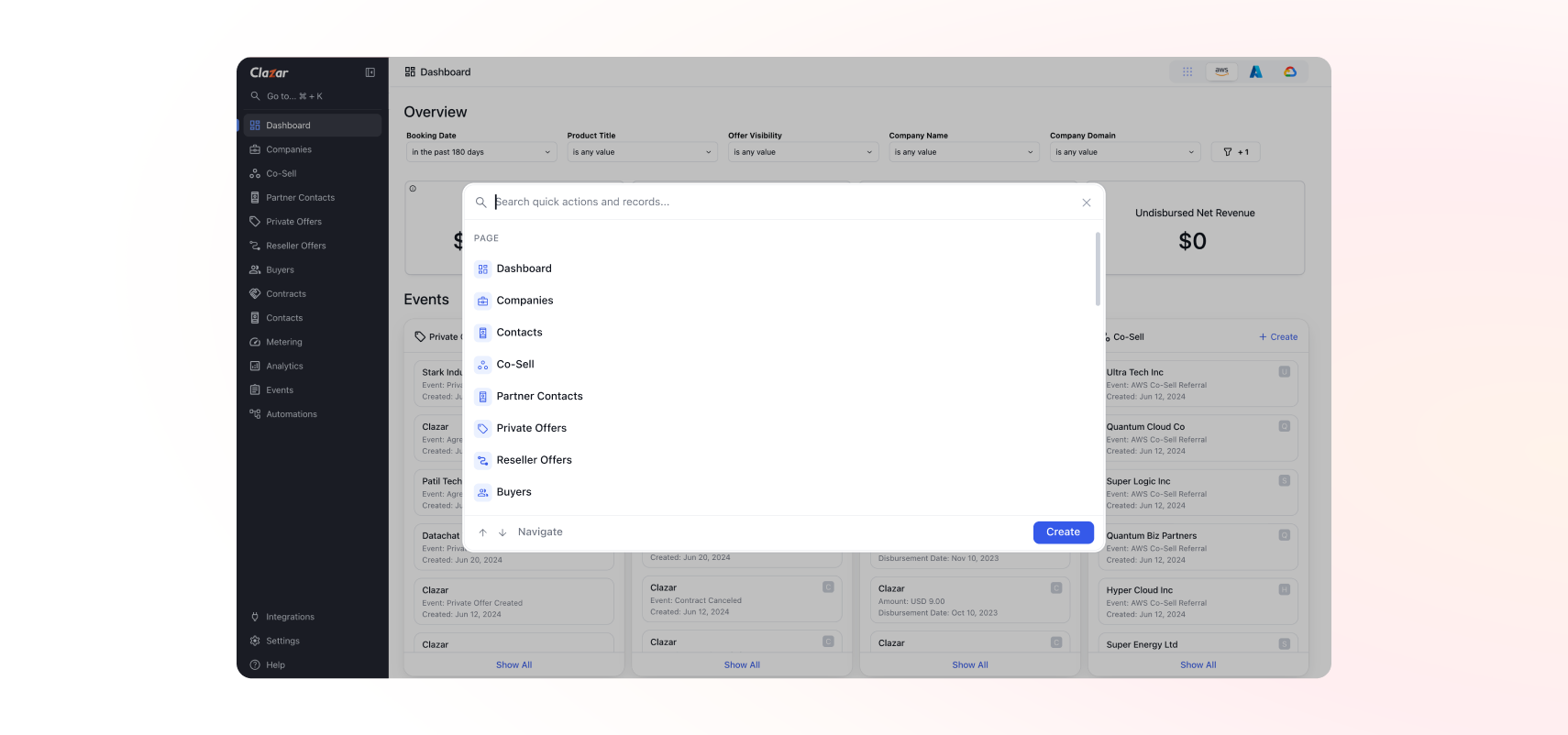
Global Search
You can now search and navigate across Clazar instantly. Global Search makes it simple to find routes, entities, and records without leaving your current page.
Features include:
Search for app routes such as Private Offers, Settings, or Integrations.
Lookup entities by name or ID with inline previews for Co-Sell, Private Offers, and Contracts.
Keyboard shortcut: Open with ⌘ + K anytime.
This gives you fast, universal navigation across the entire Clazar platform.
Azure VM Listing Sync & Private Offers
You can now sync your Azure VM listings into Clazar and create Private Offers directly from them — unlocking customized deal-making for VM-based products.
Highlights:
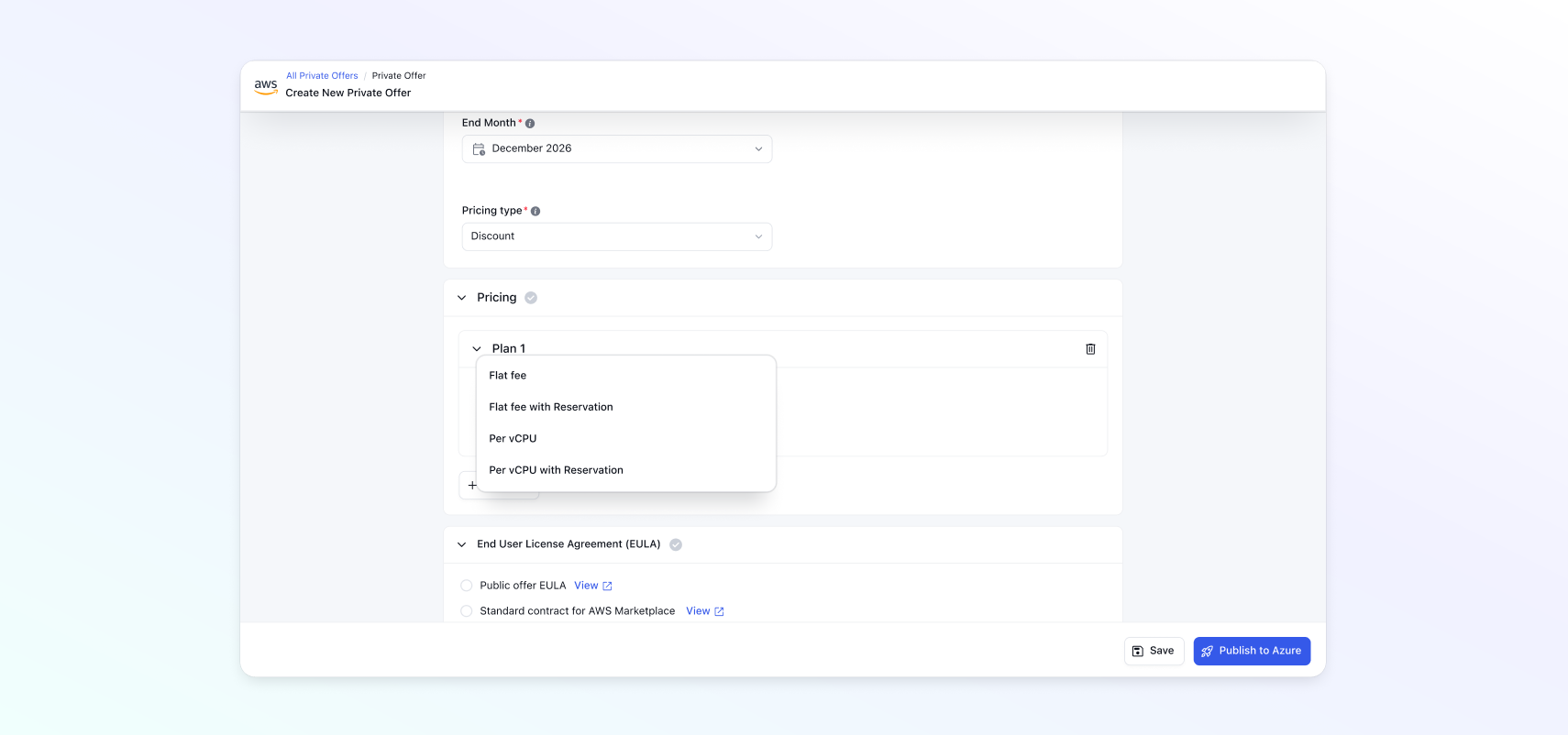
Create private offers from existing Azure VM plans (Free, Flat Rate, Per vCPU, Per vCPU Size) (Note: Per Market & vCPU Size is currently not supported).
Flexible pricing options- Choose between % discounts off the public list price or absolute pricing:
Percentage Discount (off public list price): You keep your public list price for each plan, and apply a % discount that the customer receives when purchasing via the private offer. Example: Public price: $5.00/hour → Private Offer at 20% off = $4.00/hour. Monthly spend drops proportionally with usage.
Absolute pricing: You set fixed custom rates per plan and (optionally) per VM size. This is fully independent of the public list price. Availability rule: In Azure VM private offers, absolute pricing is available only for VM Software Reservations (VMSR); usage‑based VM plans support discounts only. Example: Public 8‑core plan: $8.00/hour → Private Offer fixed at $5.00/hour, applied through a 1–5 year software reservation.
Licensing models (when usage charges apply)
Usage‑based (pay‑as‑you‑go) — billed per hour using one of the pricing bases above; can optionally enable reservation pricing. Clazar supports only usage‑based pricing.
BYOL (Bring Your Own License) — no usage‑based software charge in Marketplace; customer brings license; reservation pricing doesn’t apply. Clazar doesn’t support BYOL pricing.
Reservations support: A VM Software Reservation (VMSR) discounts the VM software plan (not Azure compute) in exchange for a term commitment. Azure allows you to configure terms of 1–5 years for predictable software revenue. (Note: Currently, Azure API supports only 1-year or 3-year contract duration on the plan for all billing frequencies, which is what we support.)
Custom billing frequencies — monthly, upfront annual, or flexible phased payments.
This update provides sellers with complete flexibility to structure VM Private Offers while maintaining control over pricing and predictability.
New Azure Listing Categories: AI & ML
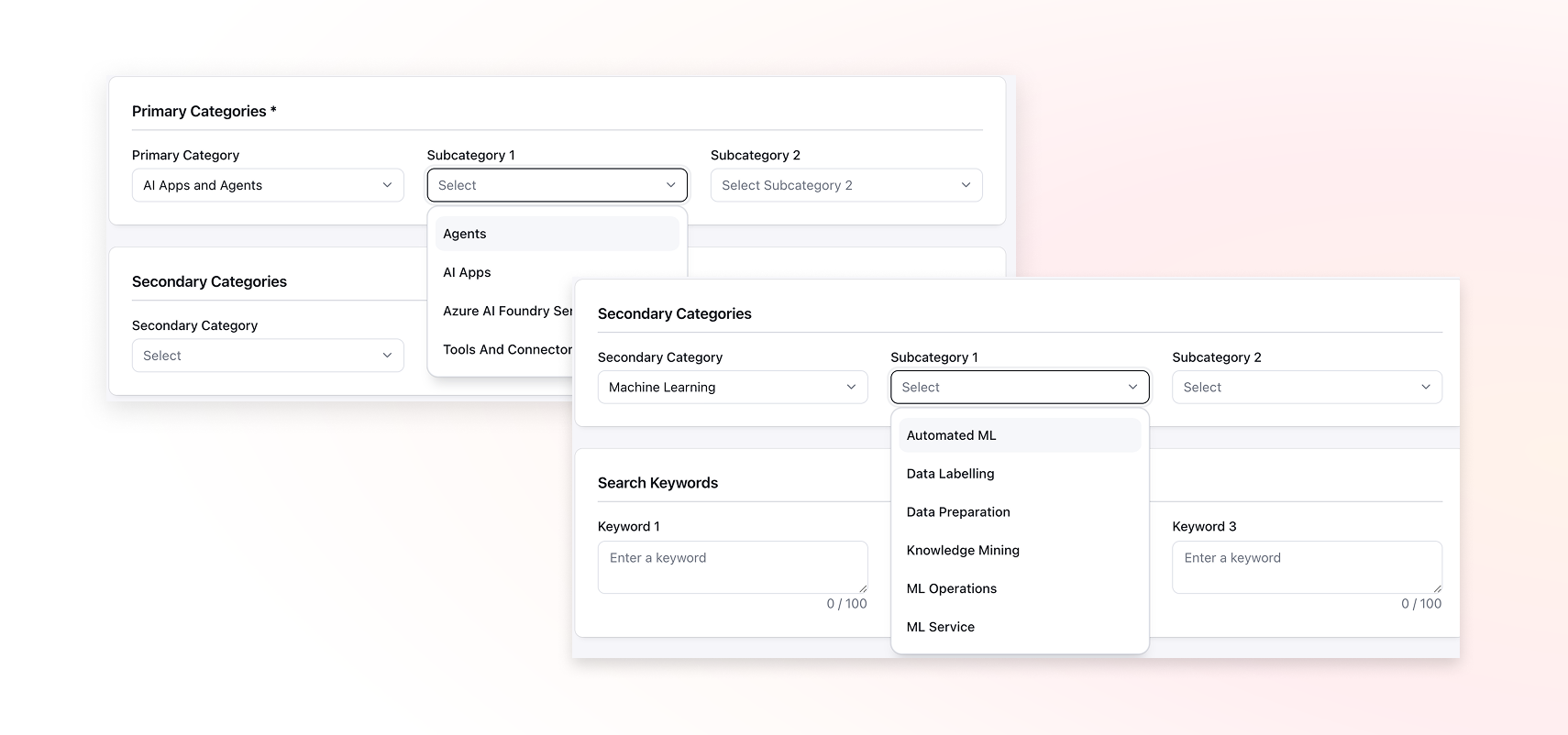
To align with Azure’s latest taxonomy, Clazar now supports two new primary categories for Azure listings:
AI Apps and Agents
Machine Learning
Each includes its own subcategories, helping your listings stay compliant and discoverable in Azure’s marketplace updates.
Private Offer Field Mapping in Salesforce & HubSpot
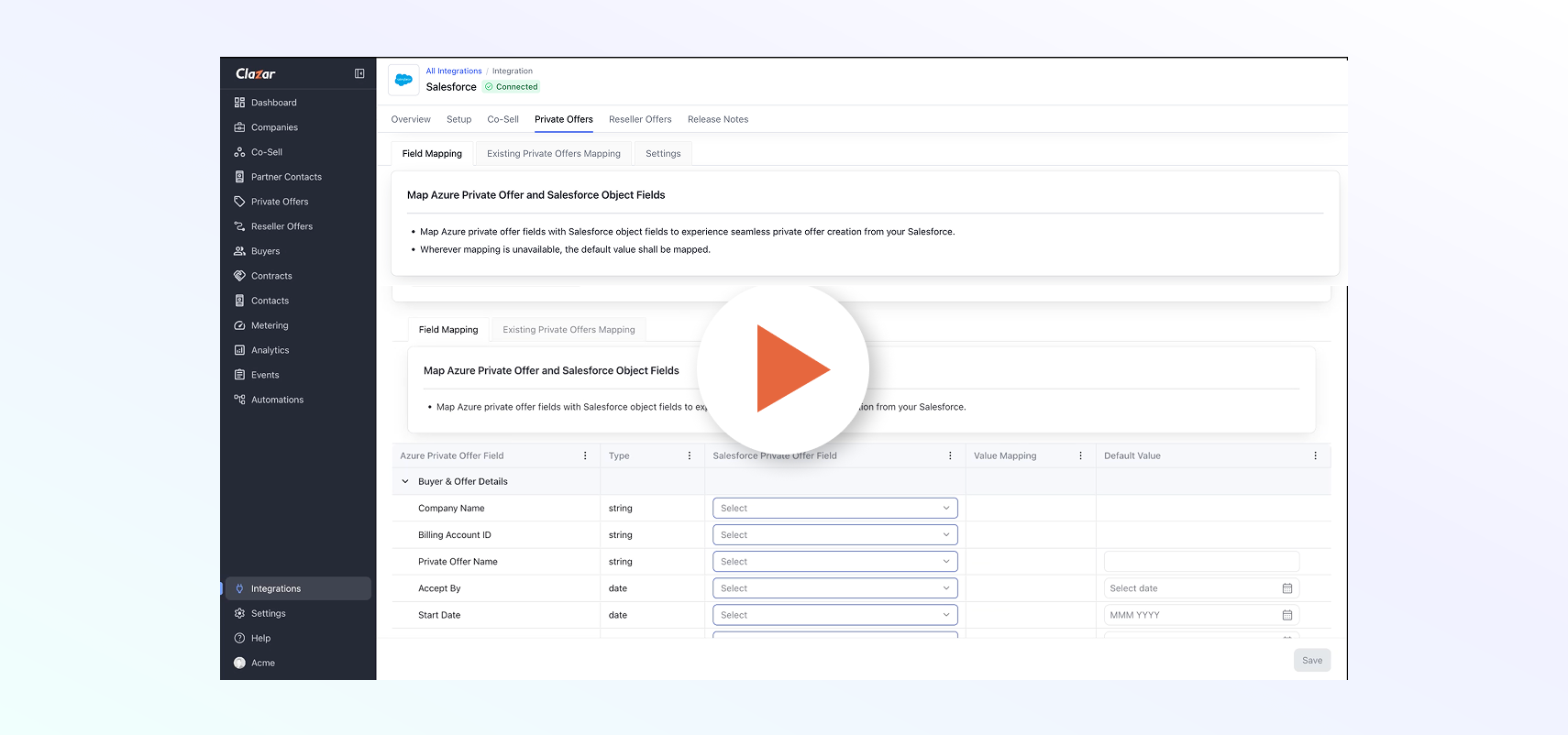
Private Offer management is now faster and more consistent across Salesforce and HubSpot. The update introduces a cleaner UI, default field values, and Azure-specific enhancements to make offer creation effortless.
Key improvements include:
New entity tables for a consistent experience across clouds.
Default values for commonly used fields like listing type, renewals, and flexible payments.
Azure-specific fields such as date pickers for Accept By, Start, and End dates.
This update brings clarity, saves time, and ensures sellers can manage Private Offers with fewer clicks and fewer errors.
Know more about changes in Salesforce: Enhancing Private Offer Field Mapping in Salesforce
Co-Sell Mapping Enhancements with Validation Messages
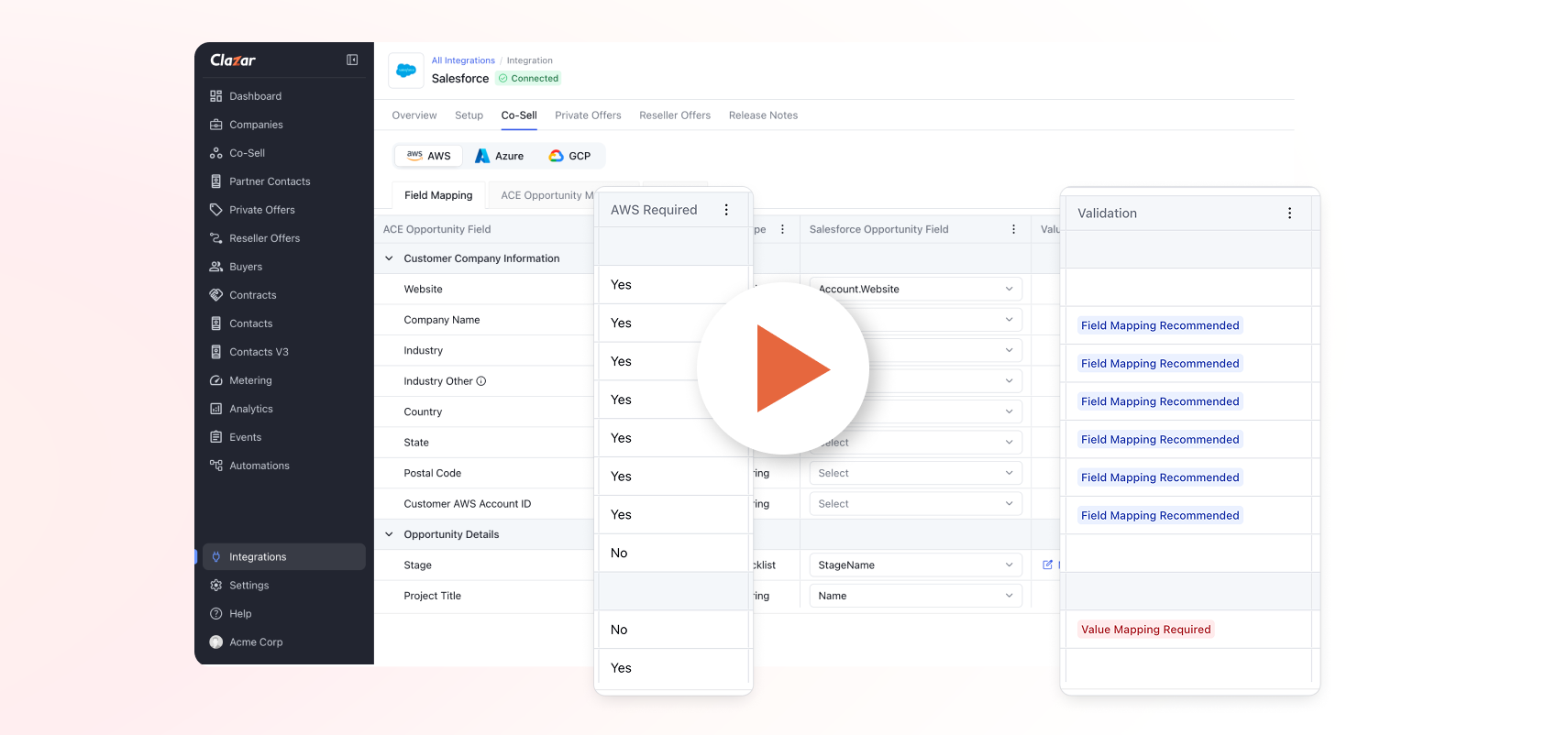
Setting up field mapping is now clearer and error-free. We’ve introduced new validation messages and a “Required by Cloud” column to make setup guidance more actionable. Enhancements include:
“Required by Cloud” column that highlights mandatory fields for each cloud (AWS, Azure, GCP).
New validation types to flag what’s needed before you enable Auto-Create:
Field Mapping Required
Field Mapping Recommended
Field Mapping or Default Value Required
Value Mapping Required
These validations ensure complete and accurate mappings, reducing setup time and preventing sync errors.
Know more: Loom
Expanded Azure Co-Sell Field Support
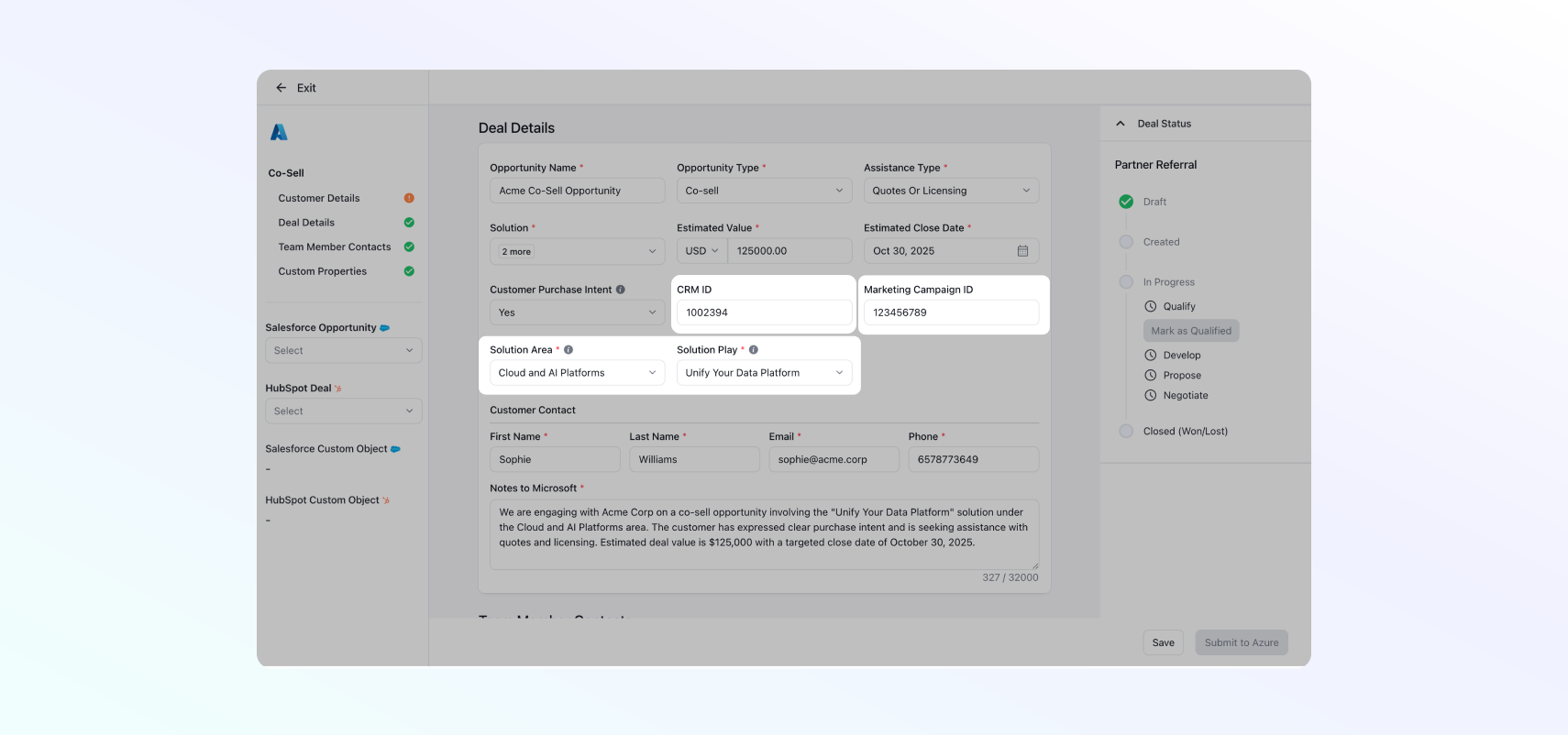
We’ve expanded Azure Co-Sell field mapping to capture more deal context. New fields supported:
CRM ID
Solution Area
Solution Play
Marketing Campaign ID
GCP Future Billings Dashboard
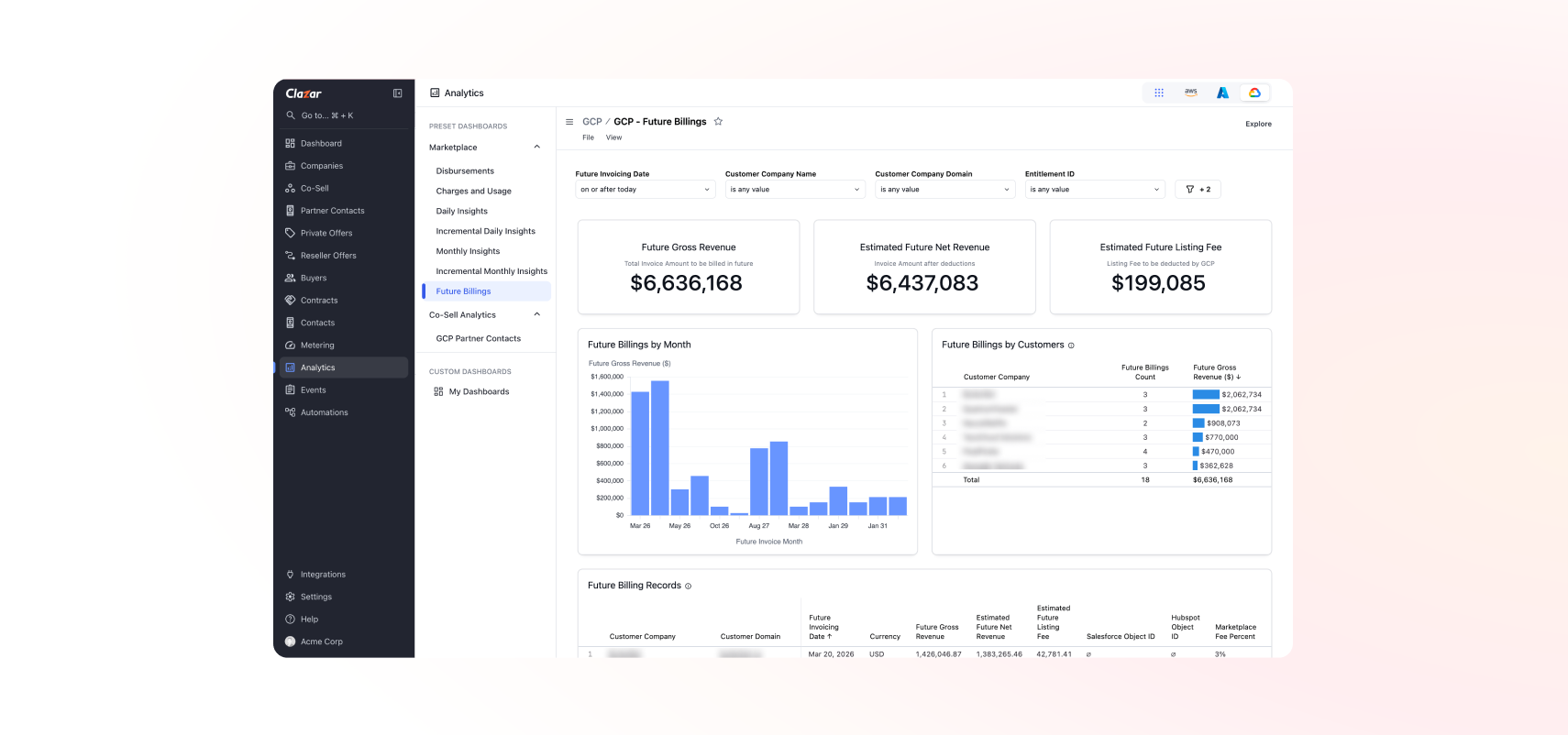
We’ve launched the GCP Future Billings Dashboard to help Finance and Partnership teams get better visibility into upcoming GCP billing events — especially useful for multi-year contracts.
The dashboard shows:
Future revenue at a glance — Gross, Net, and Estimated Listing Fees.
Monthly breakdowns for upcoming billing periods.
Top customers contributing to future revenue.
Detailed records tied to customer, agreement, and offer details.
This helps teams forecast more accurately and plan cash flow around future GCP billings.
Reconcile Azure earnings with the disbursement tables
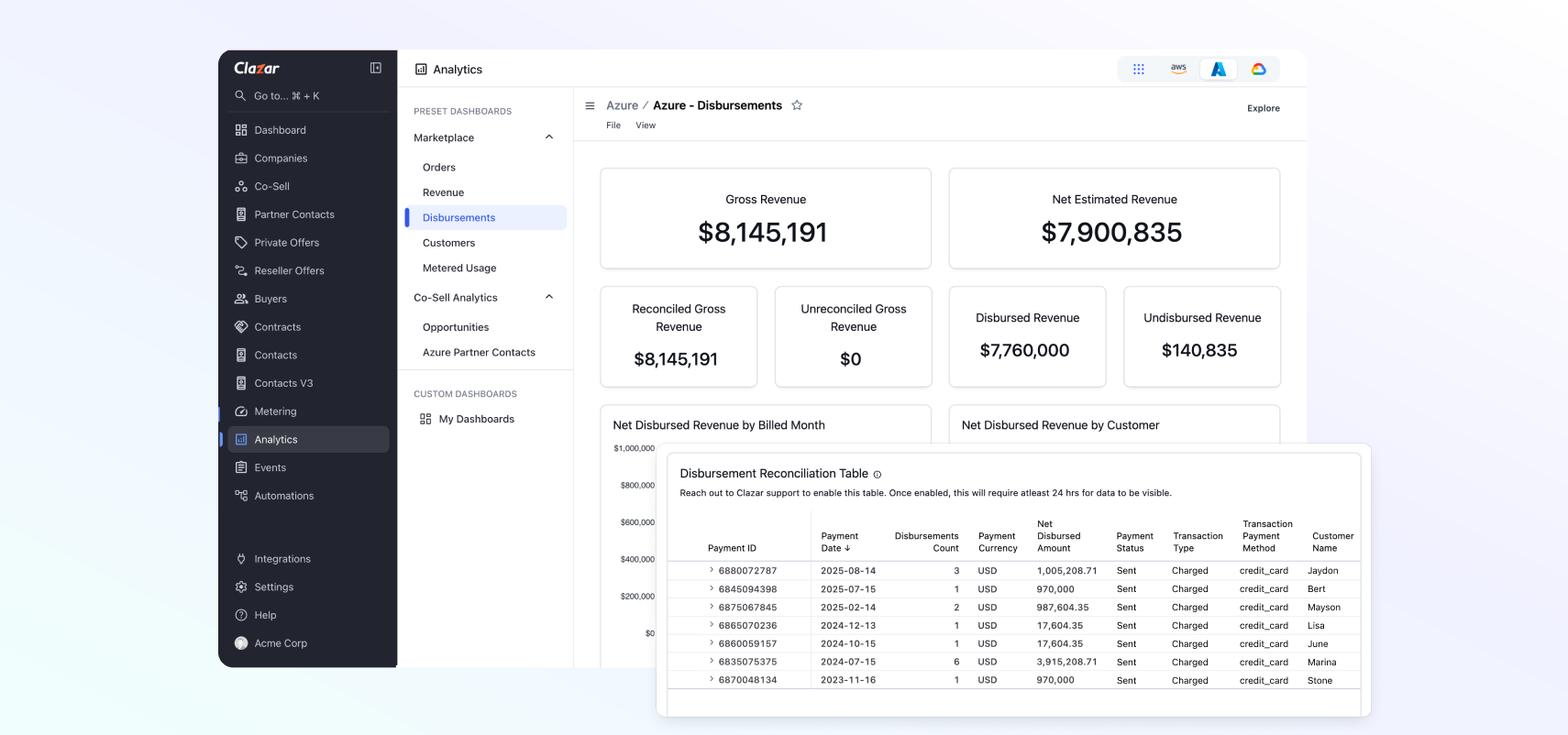
Finance teams can now view and reconcile Azure earnings data directly in Clazar Analytics. Disbursements are grouped by Payment ID, making it easy to match them against bank statements.
To get started:
Authorize via Azure credentials on the setup page to pull earnings data.
Tokens last for 90 days; after this period, reauthorization may be required.
This makes reconciliation simpler, faster, and more transparent for Azure sellers.
Contract-Level Financial Metrics
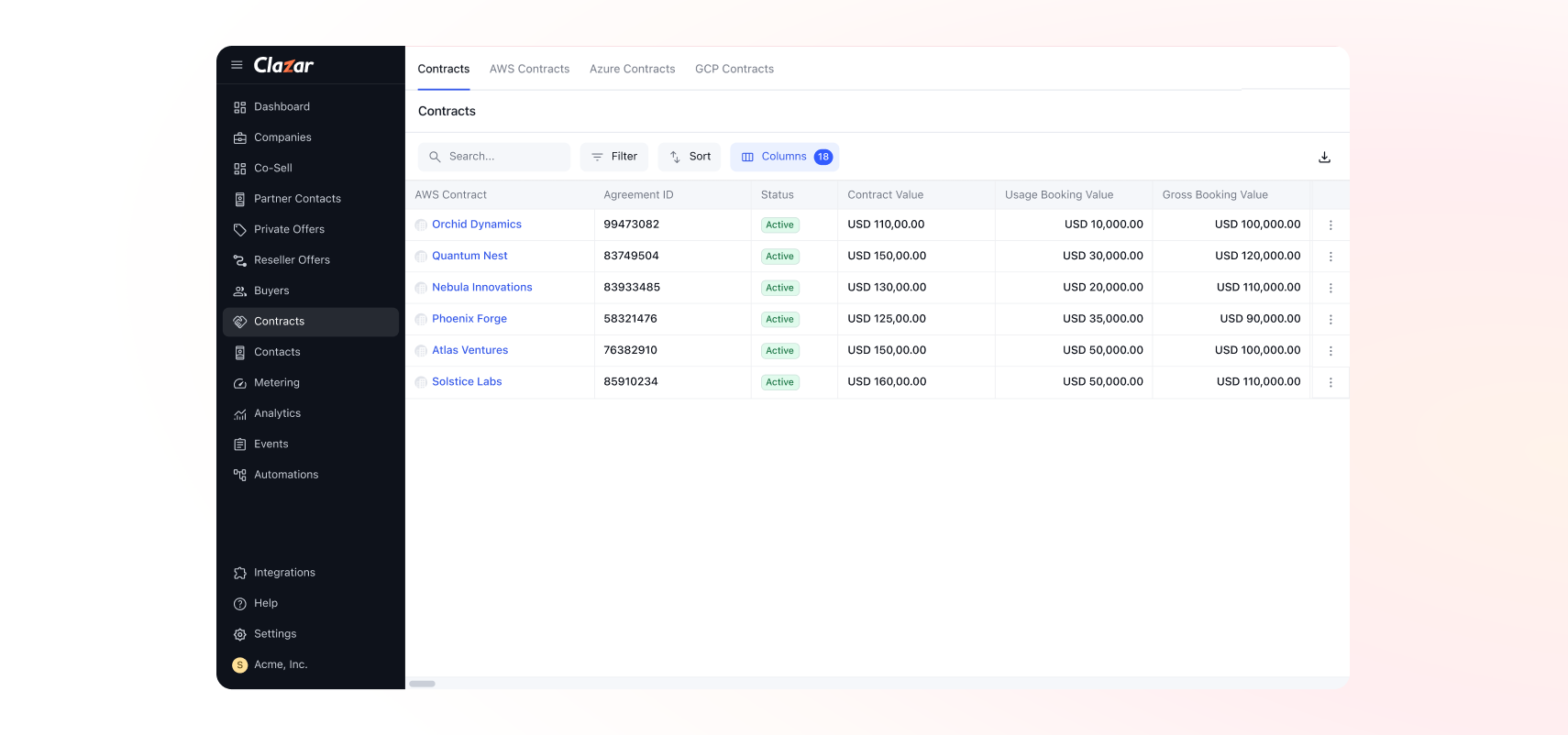
We’ve added new financial metrics to the Contracts view to help sales and revenue ops teams assess contract performance at a glance.
New columns available for AWS Contracts:
Usage Booking Value: value from metered/usage-based components.
Gross Booking Value: Contract Value + Usage Booking Value.
Gross Billed Revenue: billed portion of the Gross Booking Value.
Net Disbursed Revenue: billed revenue minus marketplace fees.
Contract Duration: duration of the contract term.
These metrics make it easier to understand total contract value, billed portions, and realized revenue, all in one place.
Track gross refunds by cloud
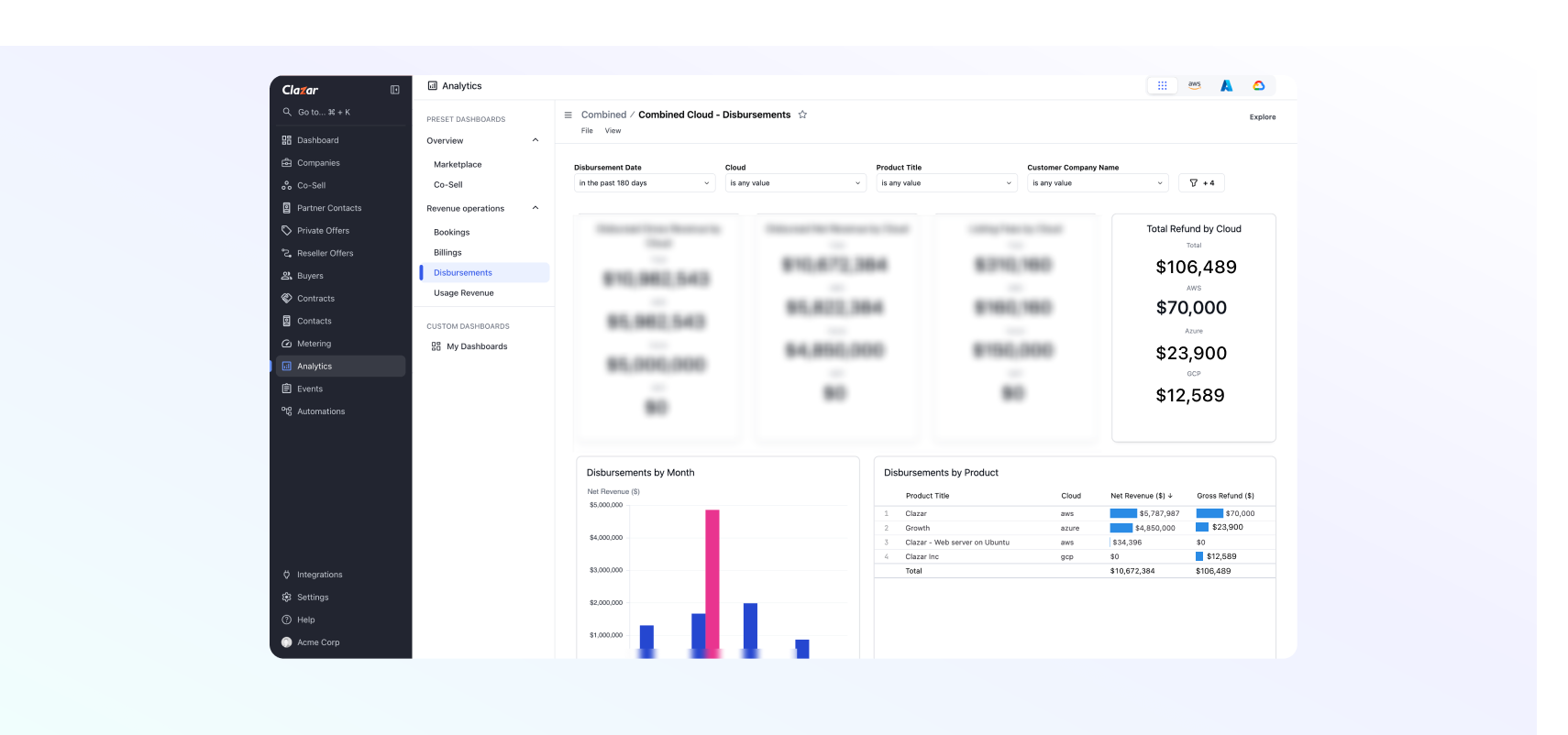
We’ve added a new view in the Combined Cloud Analytics dashboard to help you track and analyze refunds across all clouds, giving you a unified, multi-cloud perspective on refund trends.
You can now:
Track gross refunds across AWS, Azure, and GCP.
Segment and analyze by month for better visibility.
View totals and breakdowns in one place.
Gross Refunds have also been added to Disbursement Records for GCP and Azure.
Smarter Subscription Handling with Orb
We’ve enhanced how Clazar manages Orb subscriptions. Previously, when a customer canceled a direct subscription mid-month, Orb would retain a customer-level balance. If that customer then started a new AWS Marketplace subscription, Clazar needed to ensure AWS wasn’t billed again until that balance was consumed.
To solve this, Clazar now deducts existing Orb balances before metering usage to AWS.
If a customer has multiple subscriptions, the balance is automatically adjusted across all active subscriptions.
This ensures accurate metering, no double charges, and full alignment between Orb and AWS Marketplace usage.