GCP Producer Portal – Self-Serve Free Trials
Last updated: September 2, 2025
📌Overview
Google Cloud is simplifying the Free Trial experience for ISV partners. A new Free Trial section is being added to the Producer Portal to provide a self-serve experience for enabling or disabling trials directly on listings.
Free trials add tremendous value for both ISV partners and for Google Cloud customers alike. It allows ISVs to have a wider reach and for customers who want to try before they buy a product.
🕒Current Process (Before Aug 15)
ISVs had to fill in the Cloud Marketplace Solution Trial Intake Form, if they want to configure free trials for their products
The Marketplace team reviewed and configured the trial, which could take multiple days.
✨What's Changing (Effective Aug 15)
A new Free Trial section will appear on the Producer Portal for each listing.
ISVs Partners can:
✅Create a new Free Trial
✅Disable an existing Free Trial
Trials are configured instantly, without requiring form submission.
It is available for both new and existing listings.
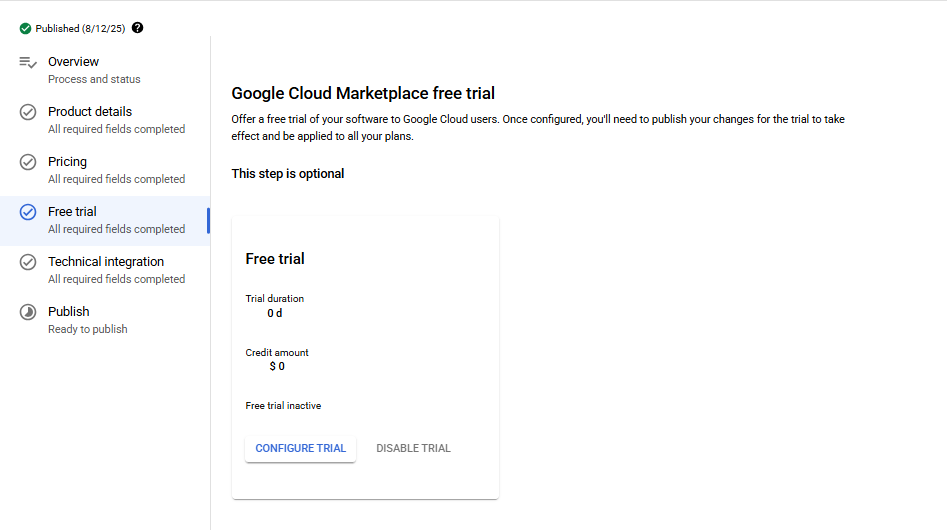
Free Trial option
Note : If a free trial is added or disabled on an existing listing, the partner must republish the listing for changes to take effect.
🔧What's Not Changing
The ISV Partners will need to specify both:
Trial period (in days) — e.g., 30 days.
Trial credit amount (in USD) — e.g., $100.
Additional considerations mentioned here will continue to apply.
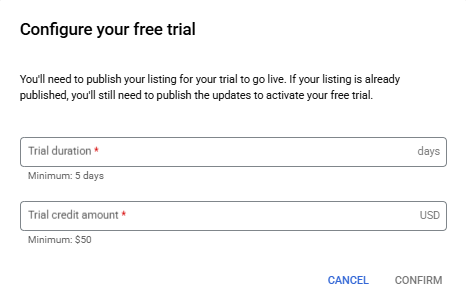
✨Key Benefits
Faster, self-serve setup (no form delays).
Greater flexibility for ISVs to manage free trials.
Seamless updates across new and existing listings
👥Need Assistance?
If you need any assistance, please reach out to the Clazar Support Team for help.
🙋FAQ
Q: What happens if I enable a free trial but don’t republish my listing?
A: The trial won’t take effect until republishing is completed.
Q: Can I remove a free trial later?
A: Yes, you can disable it anytime in Producer Portal but you must republish the listing for the change to take effect.
Q: Does this impact existing free trials?
A: No existing trials remain in place. You only need to act if you want to edit or disable them.