AWS Partner Central Migration Guide
Last updated: July 30, 2026
Overview
AWS is launching a new Partner Central experience directly within the AWS Management Console. This guide walks you through migrating from the legacy AWS Partner Network (APN) portal to the new unified Partner Central Console.
Important: Once you begin the migration, you cannot revert to the old experience. Schedule your migration during off-peak hours to minimize disruption.
Why Migrate?
Partner Central 3.0 is a strategic upgrade—not just a UI refresh—that removes operational bottlenecks and unlocks new capabilities.
Unified Access Manage co-sell opportunities, marketplace listings, private offers, and funding requests from a single experience inside the AWS Console—no more switching between the APN Portal, AWS Marketplace Manage Portal, and AWS Console. This reduces context-switching, creates a single source of truth for all partner activity, and speeds up onboarding of new team members.
Enhanced User Management User access is now controlled through AWS Identity and Access Management (IAM), replacing the legacy APN system and its 20-user ACE limit. You get:
No user limits — the 20 ACE user cap is eliminated.
Role-based access control — granular permissions by job function.
Enterprise SSO — integrate via AWS IAM Identity Center (Okta, Azure AD, etc.).
Improved security — better audit trails, MFA enforcement, and policy-driven access.
Powerful API Integration Comprehensive APIs expose nearly all portal functionality programmatically—enabling CRM sync (Salesforce, HubSpot), custom BI reporting (Tableau, Looker), and automation of routine tasks like opportunity updates, funding requests, and user provisioning.
What's New
New features
Enhanced Partner Assistant support agent
Multi-product solutions
Intelligent deal sizing tool
Partner discovery page
Language preferences
Deprecated features
S3 CRM Integration (no longer available)
Tasks (no longer accessible)
Important Changes
User Access Management — All user access is now managed through AWS IAM instead of the legacy APN user system.
Skill Builder Access — If you use AWS Skill Builder, switch from the "AWS Partner Network" login method to the "Builder ID" login method. This takes effect on your company's migration date or January 29, 2026, whichever comes first.
Migration Prerequisites
1. Link your AWS account Identify and link an AWS account to your Partner Central profile. This becomes the primary account for all Partner Central and AWS Marketplace Manage Portal users.
⚠ Critical: If you've linked the wrong AWS Marketplace account, unlink it and link the correct account before starting migration.
2. Account linking requirement Starting November 2025, account linking is required to confirm and renew your APN membership. Without a linked account by your renewal date, you will lose access to APN status and benefits.
3. Identify key personnel
Alliance Lead — user with access to export current APN user lists.
Cloud Admin / AWS Admin — user with AWS IAM permissions to create users and manage policies.
Step-by-Step Migration Process
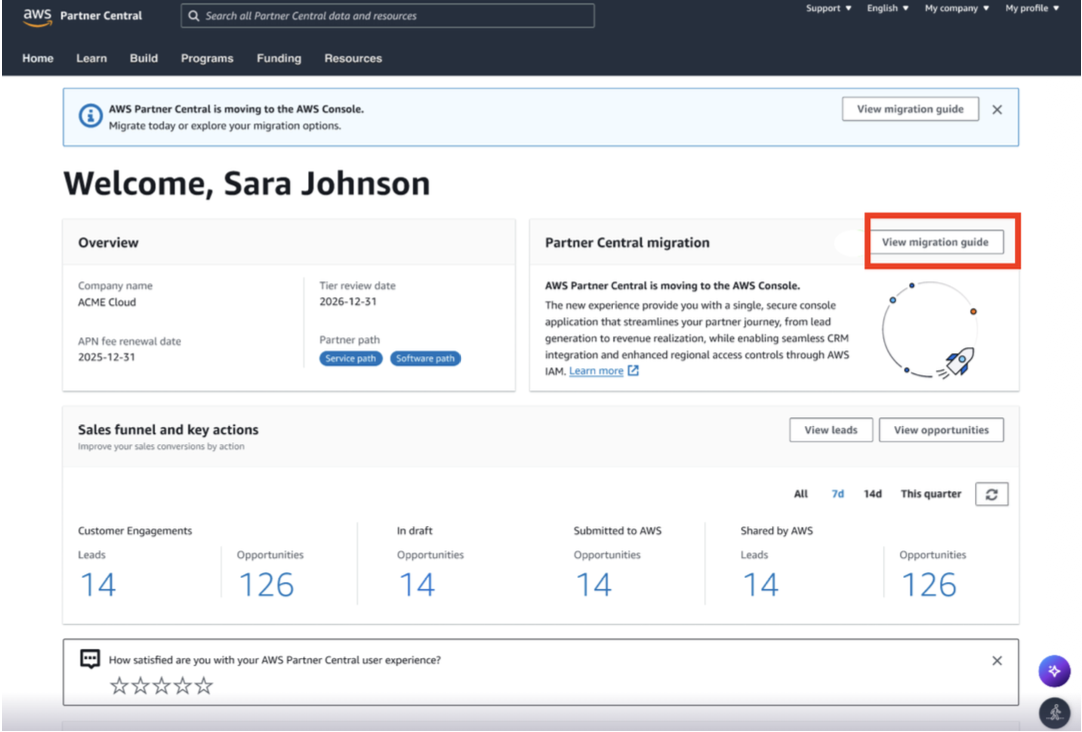
Step 1 — Access the migration tool
Log in to AWS Partner Central.
Click View migration guide.
Step 2 — Complete the pre-migration checklist
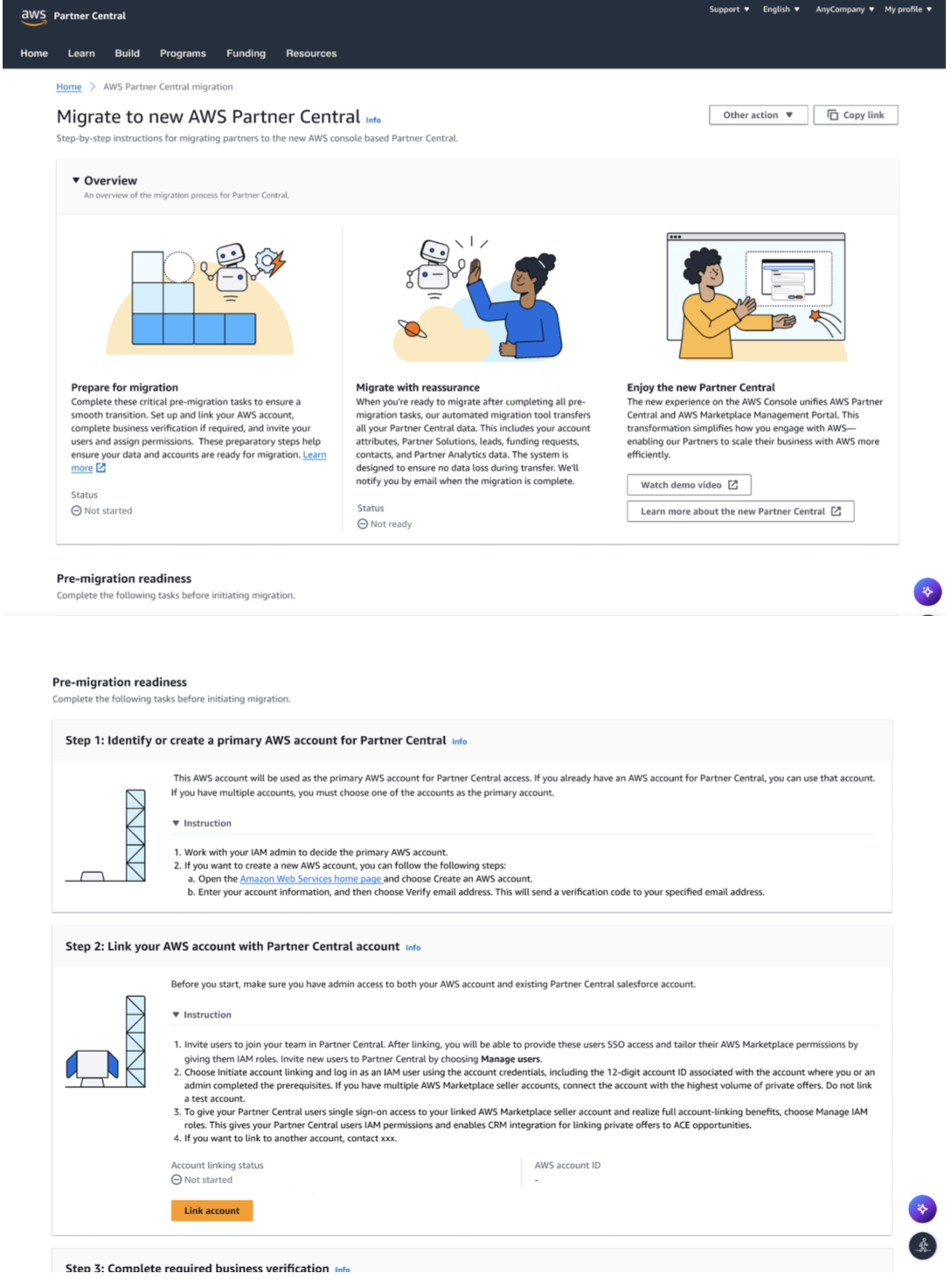
Review and complete the checklist items in Steps 1 and 2.
Confirm you have an AWS account.
Verify it is linked to the correct Marketplace account.
Step 3 — Complete business verification
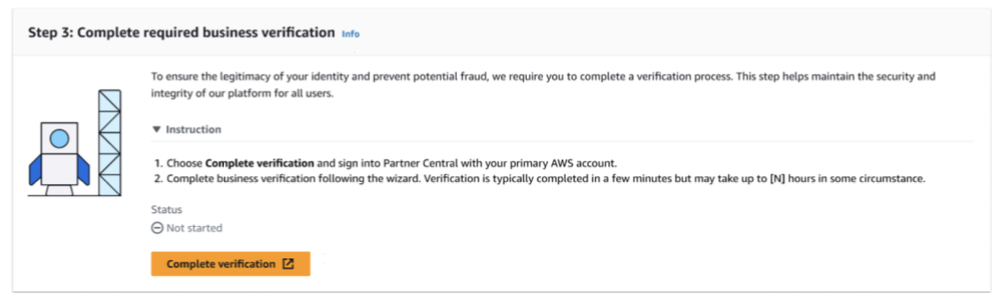
Complete the business verification process as prompted.
Step 4 — Set up user access
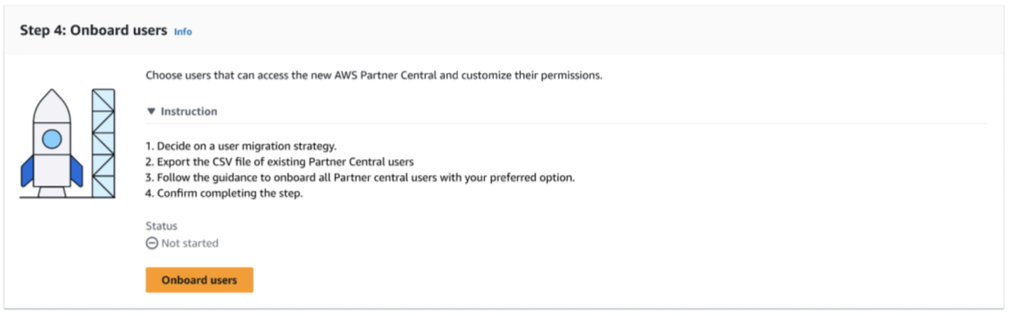
For the Cloud Admin / AWS Admin:
Ensure you have the required AWS permissions (Cloud Admin or AWS Admin role).
Under Onboarding options, select AWS IAM (Identity and Access Management).
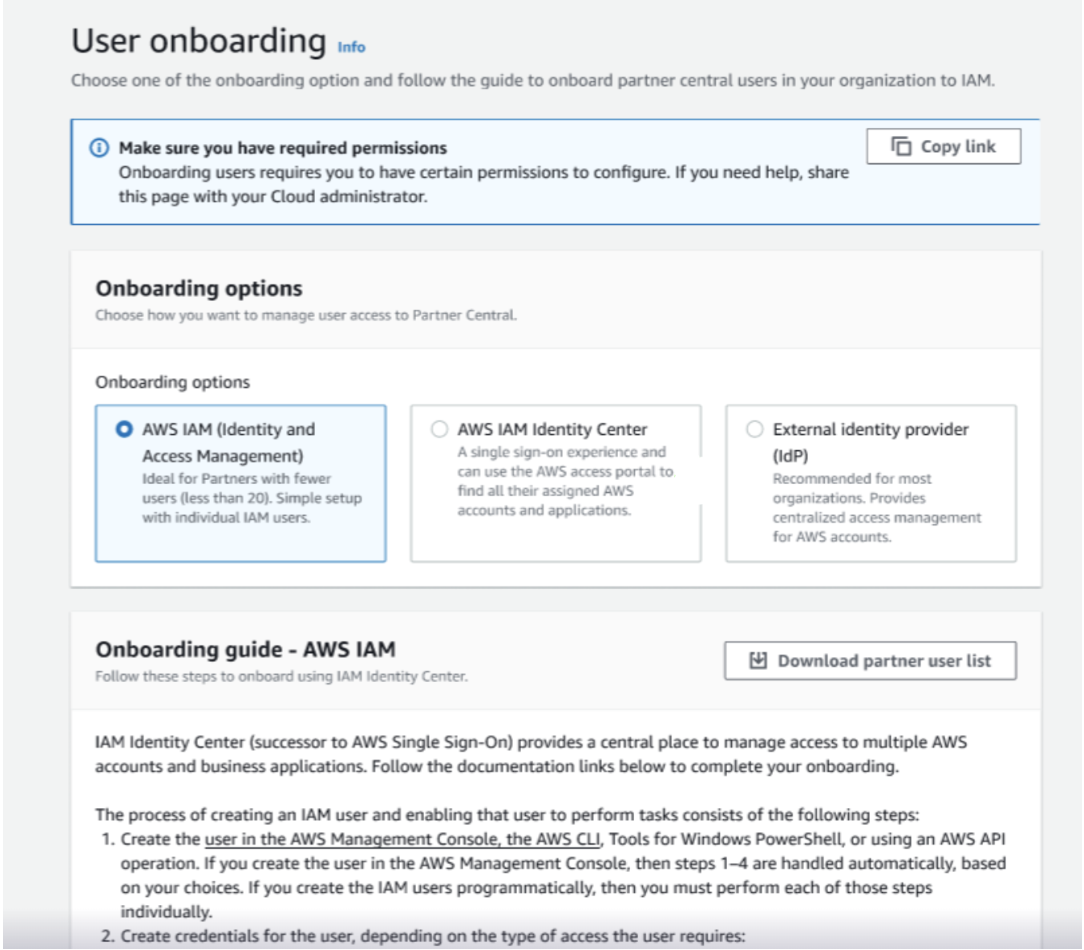
User permission mapping:
Alliance Lead responsibilities: export the complete user list from the current APN portal and share it with your Cloud Admin / AWS Admin.
Cloud Admin / AWS Admin responsibilities: create IAM users based on the exported list and attach the appropriate managed policies by role.
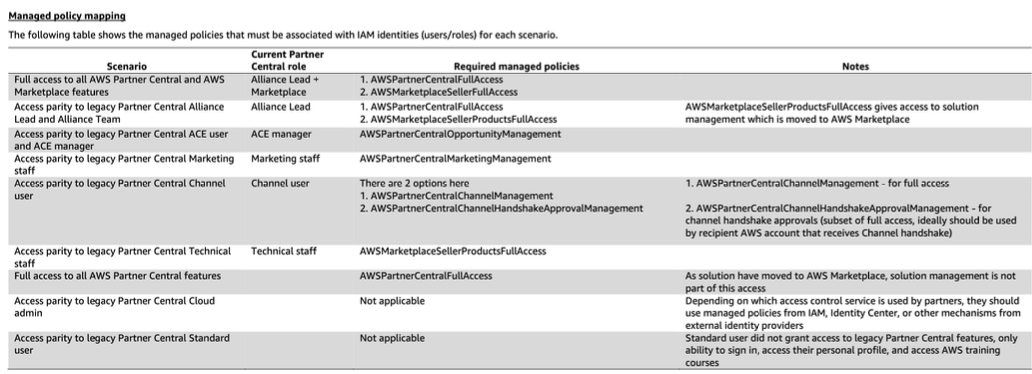
IAM Policy Assignment Guide
Match each user's current APN role to the corresponding AWS IAM policy. Example — if jon.doe@acme.corp is an ACE Manager in APN, assign the AWSPartnerCentralOpportunityManagement policy in IAM. Refer to the mapping table in the migration wizard for complete role-to-policy assignments.
Step 5: Initiate Migration
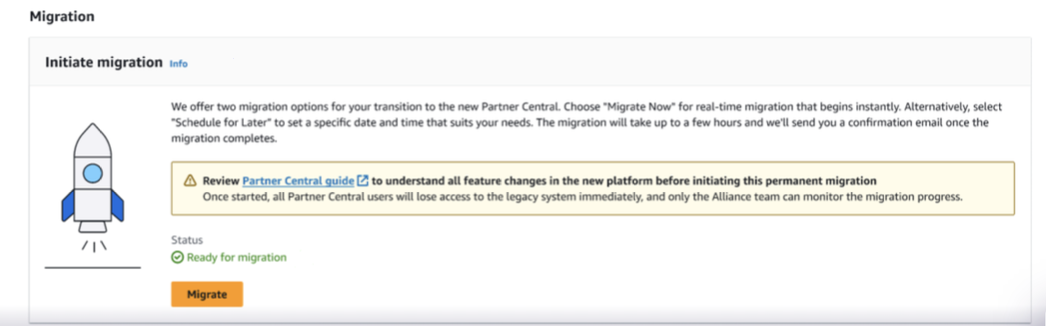
Once all users are configured, the status shows Ready for Migration.
🚨 Warning: Clicking Migrate is irreversible. You cannot return to the old APN experience after migration begins.
Hygiene check: Before migrating, screenshot key metrics from your current Partner Central (total opportunities, active leads, funding requests, etc.). After migration, compare these snapshots against the new experience to verify all data transferred correctly.
Click Migrate to begin.
Step 6 — Wait for migration completion
The system transfers all existing APN data to the new experience.
Minimum: ~15 minutes
Maximum: several hours (depending on data volume)
Best practice: schedule migration outside business hours.
Step 7 — Access your new Partner Central
When migration completes, you'll receive a confirmation email with a link to your new Partner Central Dashboard.
Frequently Asked Questions
How do I gain access to the new experience? A one-click migration tool automatically transfers your existing AWS engagement data. In-app walkthroughs help onboard users to the new Console.
What should I do now to prepare? Engage your IAM Administrator to select an AWS account and plan user permission assignments. Link your chosen AWS account to your APN account before starting migration.
How long will migration take? Most migrations complete within 15 minutes to a few hours, depending on data volume. Initial data appears quickly; full migration typically takes 30–40 minutes.
Can I continue working during migration? No. Once migration begins, the old APN portal is inaccessible until it completes. This is why we recommend off-peak scheduling.
What happens to my existing data? All existing APN engagement data—opportunities, leads, and configurations—is automatically transferred to the new Partner Central.
Need Help?
If you need assistance with your migration, contact your Clazar Customer Success team. We can guide you through the process and join calls to provide hands-on support.