[Salesforce] AWS Co-Sell Field Mapping
Last updated: April 1, 2026
What Is Field Mapping?
When you submit a co-sell opportunity to AWS through Clazar, AWS needs specific information about the deal — things like the customer’s name, the deal size, and the expected close date. Most of this information already lives in your Salesforce CRM.
Field mapping is simply telling Clazar which Salesforce field matches which AWS field. Think of it like connecting the dots — “Account Name in Salesforce = Customer Company Name in AWS.”
Once you set this up, Clazar does the heavy lifting. It automatically grabs the right data from Salesforce and fills in the AWS co-sell form for you — no copy-pasting needed.
How to Set It Up
Setting up field mapping takes just a few minutes. Here’s how:
Setting up field mapping takes just a few minutes. Here's how:
Go to Field Mapping Settings — Log into Clazar and navigate to Settings > Integrations > Salesforce > Co-Sell > AWS > Field Mapping.
You'll See Two Columns — The AWS fields on the left (what AWS needs) and your CRM fields on the right (where that data lives in your CRM).
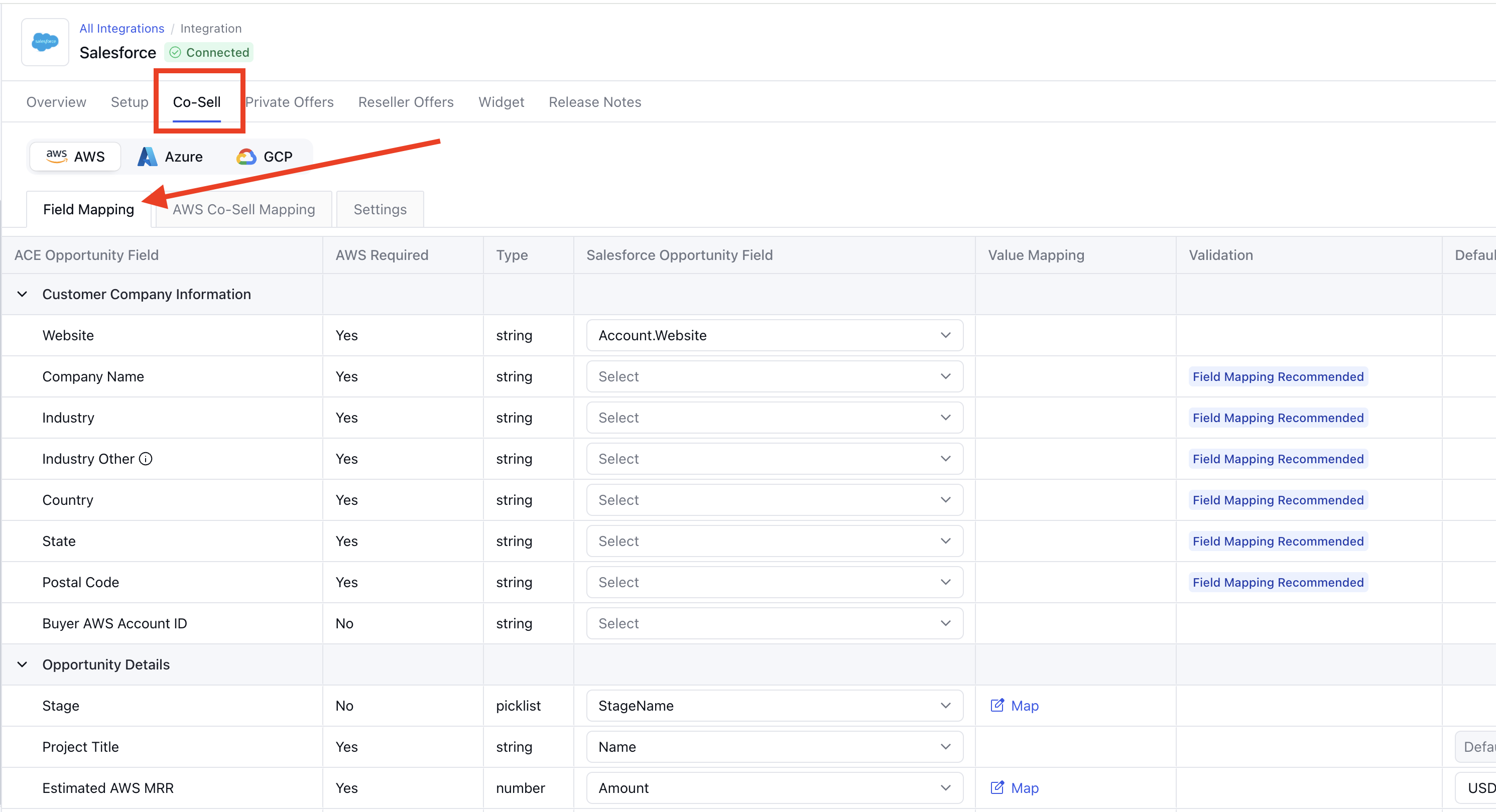
Match the Fields — For each AWS field, pick the CRM field that contains the same information. For example, match "Customer Company Name" to your "Account Name" field.
Save and Try It Out — Hit save, then try submitting a test opportunity to make sure everything looks right on the AWS side.
What Fields Need to Be Mapped?
The table below shows every field AWS needs for a co-sell submission, along with where that data typically lives in Salesforce.
Customer Company Information
ACE Opportunity Field | Related CRM Field | Description |
Website | Buyer's website | Company Details |
Company Name | Buyer's Company Name | Company Details |
Industry | Buyer's Industry Name | Company Details |
Industry Other | This field is required when the selected industry is 'Other' | |
Country | Buyer's Company Country | Company Details |
Postal Code | Buyer's Company Postal Code | Company Details |
Customer AWS Account ID | Buyer's Billing Account ID | Company Details |
Opportunity Details
ACE Opportunity Field | Related CRM Field | Description |
Stage | Sale Stage | The opp stage according to seller at which the sales process is. You can map these predefined stages given by AWS to your Salesforce stages using Clazar |
AWS Stage | AWS STAGE | The sales stage as per AWS |
Project Title | Opportunity Name | The Project Title in AWS co-sell is a brief, descriptive name summarizing the project’s scope, customer, and primary objectives. |
Estimated AWS MRR | Amount | |
Target Close Date | Close Date | The target date to close the opportunity |
Project Description | Description | The “Project Description” field in ACE should be a concise summary of the project, detailing the customer name, workload, and delivery. This provides a clear overview of the project’s scope and objectives. |
Partner Need from AWS | Seller's AE primary ask | |
Partner Specific Needs from AWS | This field is mandatory at the time of creating an AWS co-sell opportunity if Co-Sell with AWS is selected in Partner Need from AWS. | |
Opportunity Type | Type | The Opportunity Type in AWS co-sell specifies whether the opportunity is new, an expansion of an existing contract, or related to an existing contract with no expansion. |
Sales Activity | The Sales Activities field in ACE captures the specific sales actions taken with the end-customer, such as meetings, demos, and discussions, to advance the opportunity. This information helps AWS understand the level of engagement and progress made. | |
Other Solution Offered | In the ACE AWS program, “other solution offered” refers to describing a solution that doesn’t fit predefined categories in the dropdown menu. Partners must provide a detailed description of this unique solution to address the customer’s business problem | |
Use Case | The “Use Case” field in ACE specifies the type of workload or solution the partner is working on with the customer. It helps categorize the opportunity for better alignment with AWS services and solutions | |
Rejection Reason | The “rejection reason” field is used to specify why a submitted opportunity was not accepted. This could include reasons such as insufficient information, non-compliance with AWS guidelines, or the opportunity not meeting the required criteria Or rejection from Partner end | |
Next Step | Next Step | The Next Step field in ACE outlines the immediate actions planned to progress the opportunity, such as scheduling meetings, demonstrations, or further engagements with the customer. This helps maintain momentum and clarity on the progression of the deal. |
AWS Products | when submitting an opportunity, partners need to specify which AWS products will be utilized to solve the customer’s business problem. This involves selecting relevant AWS services from a dropdown menu in the submission form | |
APN Programs | The “APN Programs” field in the ACE submission form requires partners to specify the relevant APN program(s) their opportunity is associated with, such as APN Customer Engagements (ACE) or APN Marketing Central | |
Additional Comments | ||
Closed Lost Reason | Lost Reason | The Closed Lost Reason field in ACE specifies the primary reason why a submitted opportunity was not won, providing insight into the factors that led to the loss. This helps in analyzing and improving future engagements. |
Private Offer ID | ||
Partner CRM Unique Identifier | Partner CRM Unique Identifier is required to create an AWS co-sell opportunity. If not provided by the CRM, Clazar will automatically generate it. |
Solutions Offered
ACE Opportunity Field | Related CRM Field | Description |
Solution Offered | The Solution Offered field in ACE describes the partner’s solution provided to address the end-customer’s business problem. If the solution is unique or not listed, it should be specified in detail. |
Delivery Models
ACE Opportunity Field | Related CRM Field | Description |
Delivery Model | The “delivery model” field requires partners to specify how their solution will be delivered to the customer. This includes selecting from options such as on-premises, cloud, hybrid, or other relevant delivery methods from a dropdown menu |
Marketing Details
ACE Opportunity Field | Related CRM Field | Description |
Marketing Originated | It indicates whether the opportunity originated from a marketing initiative or campaign. | |
Marketing Fund Used | AWS co-sell indicates whether the opportunity has received financial support from AWS’s Marketing Development Funds (MDF) to assist with co-marketing activities. | |
Marketing Campaign | The name or identifier of the AWS marketing initiative or partner-led campaign that generated or influenced the opportunity (e.g., "AWS Migration Campaign Q2"). | |
Marketing Activity Use Case | Specifies the type of use case promoted during the marketing activity — such as Analytics, Databases, Containers, IoT, etc. | |
Marketing Activity Channel | Indicates the marketing channel through which the opportunity was generated — for example:
|
Customer Contact Details
ACE Opportunity Field | Related CRM Field | Description |
Customer Contact First Name | Contact First Name | Customer Details |
Customer Contact Last Name | Contact Last Name | Customer Details |
Customer Contact Email | Contact Email | Customer Details |
Customer Contact Phone | Contact Phone | Customer Details |
Partner Contact Details
ACE Opportunity Field | Related CRM Field | Description |
Partner Contact First Name | Sales Rep First Name | Seller's AE Details |
Partner Contact Last Name | Sales Rep Last Name | Seller's AE Details |
Partner Contact Email | Sales Rep Email | Seller's AE Details |
Partner Contact Phone | Sales Rep Phone | Seller's AE Details |
Opportunity Owner Details
This needs to be a Partner Central user and if not provided, defaults to Partner Alliance Lead.
ACE Opportunity Field | Related CRM Field | Description |
Opportunity Owner First Name | Alliance Lead First Name | |
Opportunity Owner Last Name | Alliance Lead Last Name | |
Opportunity Owner | Alliance Lead Email |
SaaS Details
Only applicable for SCB Eligible Sellers
ACE Opportunity Field | Related CRM Field | Description |
Contract Start Date | Start Date | The date when the customer’s contract for the software or service is set to begin. This marks the official start of the billing or service period. |
Contract End Date | End Date | The date when the customer's contract is scheduled to end. This defines the duration of the agreement. |
Customer Software Value | Amount/ACV | The total dollar value of the software being sold to the customer under this opportunity. It helps AWS understand the deal size and potential impact. |
Procurement Type | Indicates the type of listing that the Buyer will purchase. Example:
|